
Access Policy Schedules
Time is the When part of every Access Policy. Choose Anytime or Scheduled; a scheduled policy contains one or more Weekly or One-time windows. For the Settings → Access Time Windows page, see Grace periods and timezone.
One policy grants access only when Who AND Where AND When match. Windows within one policy are ORed, and named policies are also ORed. Policies are allow-only: an inactive policy does not revoke access from another matching policy, a permanent grant, or a separate administrator/integration window.
Anytime
Anytime means the policy's Who and Where can match without a schedule restriction. It does not bypass safety, maintenance, geofence, block, rate-limit, or device checks.
Weekly windows
A Weekly window repeats using local wall-clock blocks such as Monday 06:00–08:30.
- The selected IANA timezone controls weekday, local time, and daylight-saving behaviour.
- Optional active-from and active-until instants can bound the recurrence; the end is exclusive.
- Blocks cannot overlap or cross midnight. Split an overnight period across two days.
- During spring-forward, skipped local times do not occur. During fall-back, both real instants represented by a repeated local time qualify.
One-time windows
A One-time window has one exact start and end instant. Use it for a known one-off period.
- Start and end are integer Unix seconds identifying UTC instants.
- The boundary is half-open:
[from, to). The start qualifies; the end does not. - The displayed timezone is for entry, display, and audit context. It does not change a stored instant.
Separate user and integration windows
Administrator-owned user windows and integration-provided windows remain separate additive paths; they are not converted into Access Policies and cannot be removed by editing a policy. They can target the facility, doors, or Access Scopes according to their own contract.
Integration windows retain source ownership, revision, freshness, and scope_key mapping behaviour. Unknown, disabled, unmapped, stale, or decoupled source windows do not grant access. One source cannot erase another source's windows, and neither source updates nor policy edits erase administrator-owned windows.
Permanent grants are another separate additive path. Their existing optional operating hours remain independent of policy schedules.
Grace periods and timezone
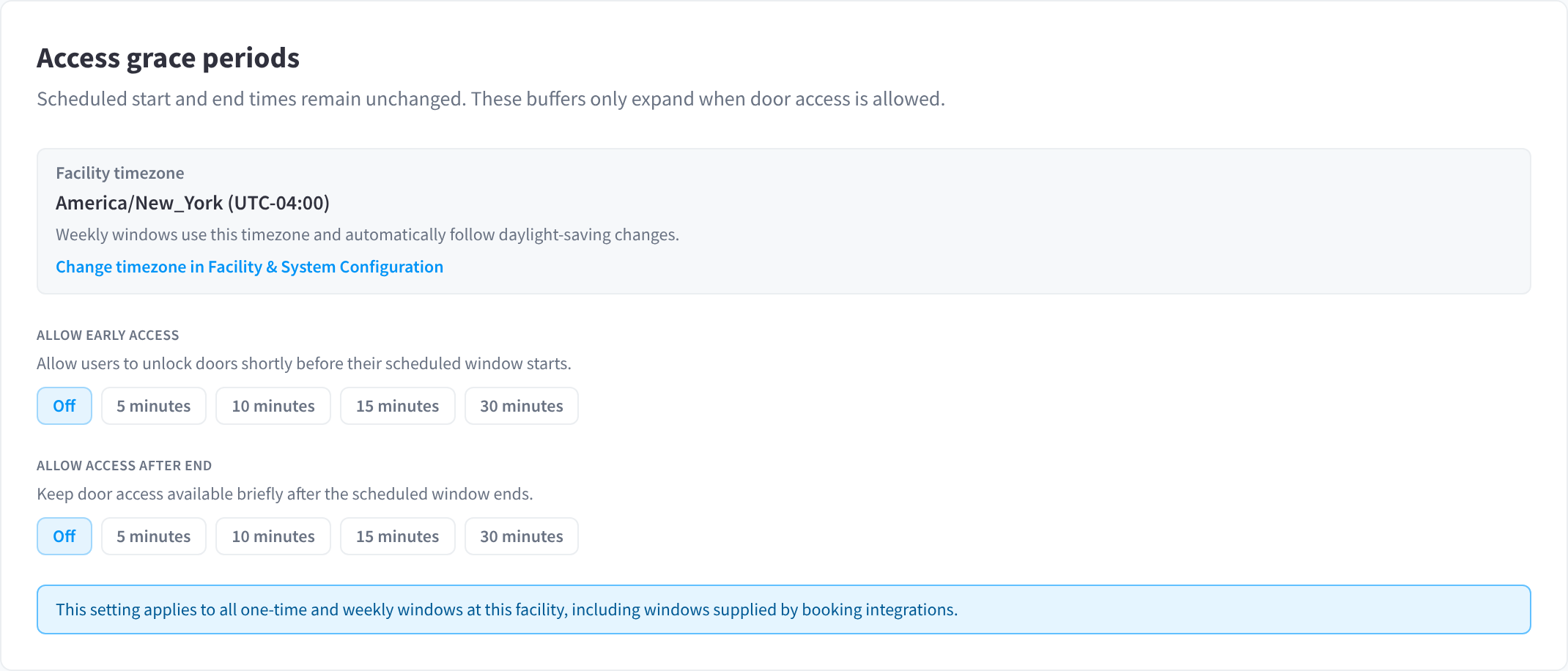
Figure 1: Settings → Access Time Windows → Access grace periods
Settings → Access Time Windows → Access grace periods sets how much leeway people get around their scheduled windows. "Scheduled start and end times remain unchanged. These buffers only expand when door access is allowed."
- Facility timezone — the timezone weekly windows use, following daylight-saving changes automatically. Use Change timezone in Facility & System Configuration to change it; see Time zone.
- Allow early access — "Allow users to unlock doors shortly before their scheduled window starts." Off, 5 minutes, 10 minutes, 15 minutes or 30 minutes.
- Allow access after end — "Keep door access available briefly after the scheduled window ends." Off, 5 minutes, 10 minutes, 15 minutes or 30 minutes.
The grace periods apply to all one-time and weekly windows at the facility, including windows supplied by booking integrations. They also count for No visit recorded: a person who unlocks during the grace period counts as having visited. For example, a hotel can set Allow access after end to 15 minutes to cover late checkouts on guest passes.
Existing schedules
Existing operating hours are imported automatically into the When section of the corresponding Access Policies. Different hours that previously applied to particular scopes or doors are preserved in policies with explicit Where targets. Administrators do not need to convert schedules manually.
Authorisation and availability
For member access, user and door safety checks run first. The server then evaluates policy, permanent-grant, administrator-window, and integration-window allow paths. Geofence and controller checks remain later authoritative gates.
A future policy window can return structured availability with its next concrete start/end, kind, label, and timezone. Supported clients use that data for display; they do not calculate authorisation locally. Exact boundaries remain [from, to).
The detailed future-window denial is outside_access_time_window. Compatibility clients can continue to receive the existing outside_access_hours reason with deniedReasonDetail: outside_access_time_window.
Attribution
A policy decision identifies the matching policy by name. For scheduled access, Access Logs can also show the active window and its concrete start and end, making it clear which When entry granted access.