
Sharing & Guest Access
Police ask for footage. An insurer wants to review an incident. A contractor needs to watch a door for an afternoon. None of them should get a Performance Hub account — and none of them should get an emailed video file that lives forever.
Share Access to CCTV creates a time-limited guest link, scoped to exactly the sections you choose, that expires on schedule and is fully audited.
Creating a share link
Open the share dialog from the module header (the share icon):
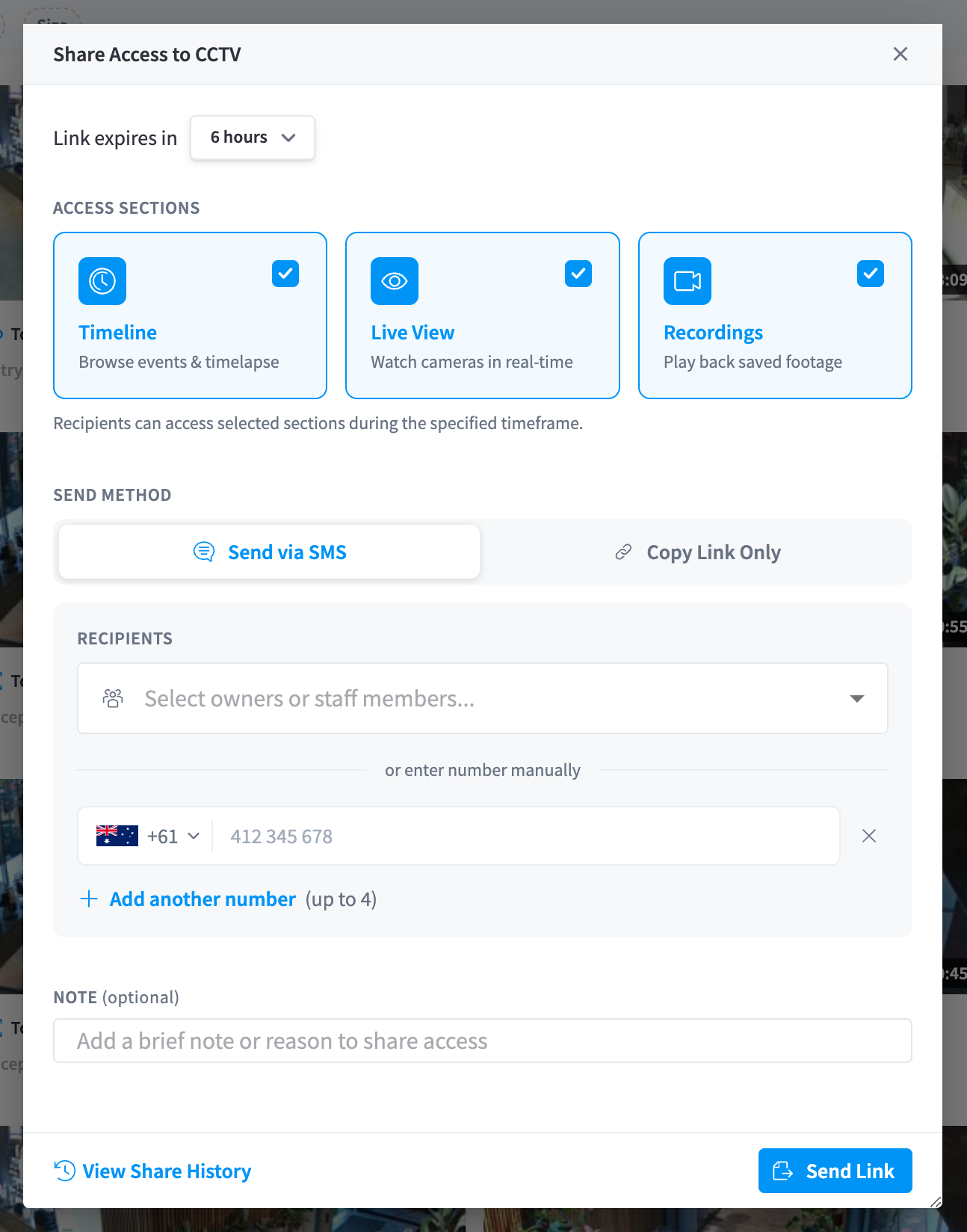
Figure 1: The Share Access to CCTV dialog — expiry, sections, and delivery
-
Choose expiry — the Link expires in dropdown: 1 hour, 3 hours, 6 hours (the default), 12 hours, 1 day, 3 days, 1 week, 2 weeks, or 1 month.
-
Choose Access Sections — any combination of:
- Timeline — "Browse events & timelapse"
- Live View — "Watch cameras in real-time"
- Recordings — "Play back saved footage"
As the dialog puts it: "Recipients can access selected sections during the specified timeframe."
-
Choose the Send Method:
- Send via SMS — pick recipients from your owners and staff, or enter numbers manually (up to 4), then click Send Link, or
- Copy Link Only — copy the URL and send it through whatever channel you prefer.
-
Optionally add a Note — "Add a brief note or reason to share access" — your future audit trail will thank you.
The dialog's View Share History link shows every link previously created — who it went to, what it granted, and when it expires.
The link itself is a long, unguessable URL. Anyone holding it gets the scoped access until expiry — treat it accordingly and prefer SMS delivery straight to the intended person.
What guests see
Guests land in a stripped-down CCTV view containing only the sections you granted — no Performance Hub navigation, no settings, no other modules. Within those sections:
| Guests can | Guests cannot |
|---|---|
| Watch live streams (if Live View was granted) | See any people/AI data — names, face matches, and people counts are never shown to guests |
| Scrub the timeline and play footage (if Timeline was granted) | Retain or unretain recordings |
| Browse and play clips (if Recordings was granted) | Create or edit live views, or change any camera or device setting |
| Restart devices or access device dialogs | |
| Reach any other part of Performance Hub |
Guest sessions are short-lived browser sessions tied to the link — when the link expires, access ends everywhere it was opened.
Auditing
Guest activity appears in the module's Access Logs alongside staff activity — see Security & privacy:
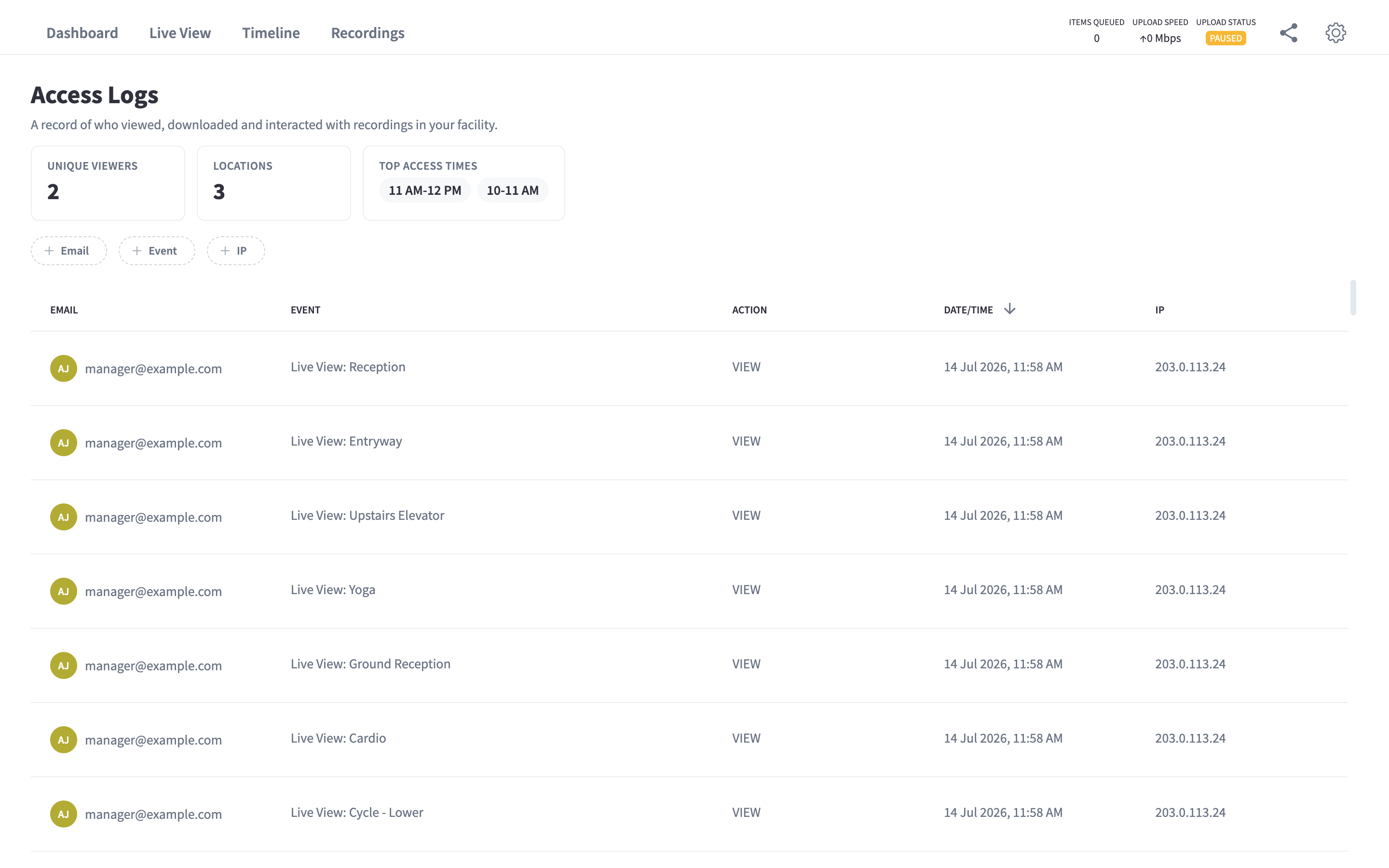
Figure 2: Access Logs — every viewing session, including guest links, with timestamps
You always have an answer to "who has seen this footage?"
Revoking access
Share links expire on their own — that's the point of the mandatory expiry. Choose the shortest expiry that does the job: an incident review usually needs hours, not weeks. If a link must die early (sent to the wrong number, incident closed), contact your Performance Hub administrator or support to invalidate the facility's outstanding guest tokens.
Sharing vs downloading
| Share link | Download + email | |
|---|---|---|
| Expires | Yes, automatically | Never — the file is out there |
| Scoped | Only the sections you chose | The whole file |
| Audited | Every session logged | Nothing after it leaves |
| Quality | Full playback experience, timeline context | One clip, no context |
Download when you need a local copy (see Recordings); share when someone else needs to look.
Related pages
- Security & privacy — the audit trail and data handling
- Access control & permissions — who can create share links
- Recordings — downloads for your own use