
Face recognition tuning
Settings → Face Recognition exposes the knobs behind the identification pipeline: Member Matching, Shadow Profiles, and Self Learning (plus Blacklist Faces, documented in Blacklist). Each section offers Lenient / Balanced / Strict presets, with every underlying threshold adjustable individually and its default printed next to the slider — e.g. "(Default: 30 mins)".
Ground rules before touching anything:
- Balanced is the recommended default for every section — start there and stay there until you have weeks of real data showing a specific problem.
- Presets encode a single trade-off: Lenient identifies more people but risks more wrong matches; Strict almost never mislabels but leaves more people "Unsure".
- Change one section at a time and give it days before judging — the effects only show up in aggregate (watch the Unsure % KPI in Reports).
- The settings pages include a live Logic Visualisation flow diagram rendered with your facility's current values — nodes are clickable ("Tap to scroll to this setting"), making it the best way to sanity-check what a change actually does.
Member Matching
Controls the decision from pipeline steps 3–5: when is a face confidently a member?
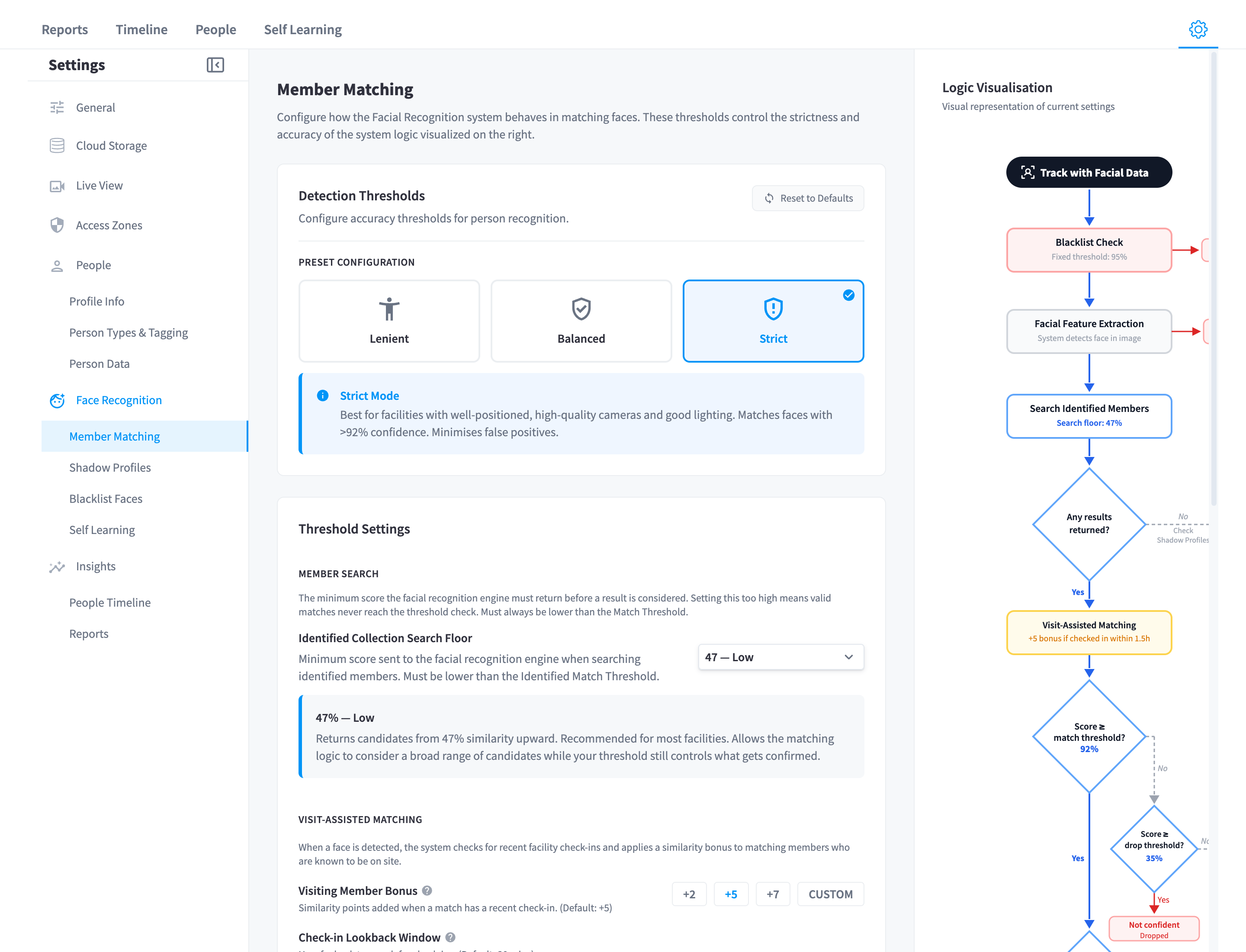
Figure 1: Member Matching — presets at the top, the live Logic Visualisation flow diagram below
Presets
| Threshold | Lenient | Balanced (default) | Strict |
|---|---|---|---|
| Identified Match Threshold | 80 | 85 | 92 |
| Drop Threshold | 55 | 45 | 35 |
| Identified Collection Search Floor | 35 | 40 | 47 |
Individual thresholds
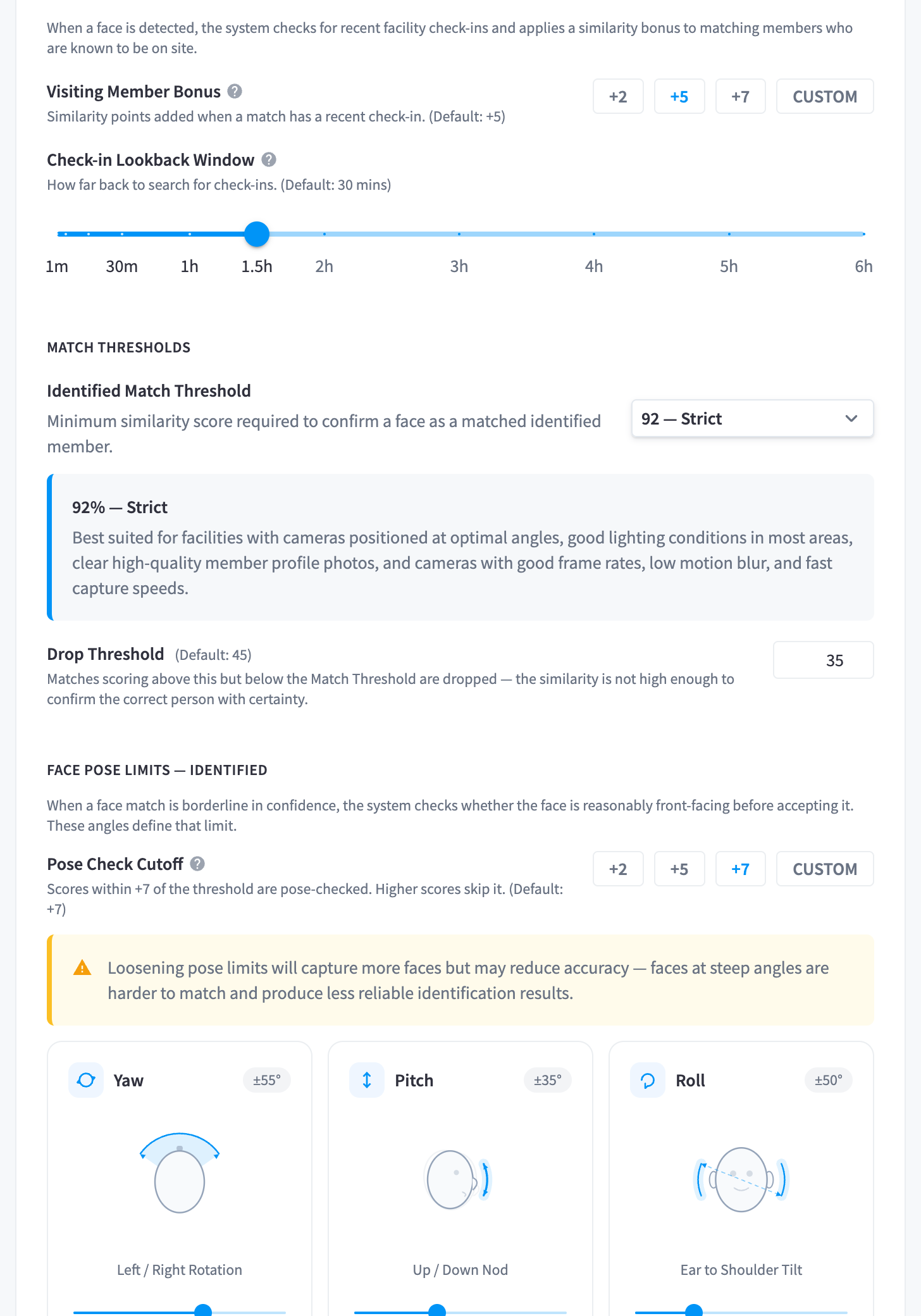
Figure 2: The individual Member Matching sliders, each labelled with its default
| Setting | Default | What it does |
|---|---|---|
| Identified Match Threshold | 85% | Minimum similarity to confirm a face as a member. The single most consequential slider |
| Drop Threshold | 45% | Below this, a partial match is discarded rather than kept as "unsure" |
| Identified Collection Search Floor | 40% | Minimum similarity for candidates to be returned by the search at all |
| Visiting Member Bonus | +5 | Similarity points added when the candidate checked in recently — visit-assisted matching |
| Check-in Lookback Window | "(Default: 30 mins)" | How recent a check-in must be to earn the bonus |
| Borderline Confidence Zone | "(Default: +7)" | Scores within this band above the match threshold get the extra pose check |
| Identified pose limits | Yaw 55° / Pitch 30° / Roll 30° | Maximum head angles accepted for borderline matches |
When to deviate from Balanced:
- High Unsure % but members clearly recognisable on camera → improve member photos first (filter the People list by "Invalid Photo"); only then consider Lenient.
- Any confirmed wrong identification → go Strict (or raise the match threshold) immediately — a wrong identity attached to detections is far more costly than an unidentified visitor.
- Front-desk camera with a wide check-in correlation → lengthening the Check-in Lookback Window slightly can lift identification at facilities where members dwell before passing a camera; keep the bonus modest.
Shadow Profiles
Controls pipeline steps 6–7: when unmatched faces link to existing shadow profiles, and how picky the system is about creating new ones.
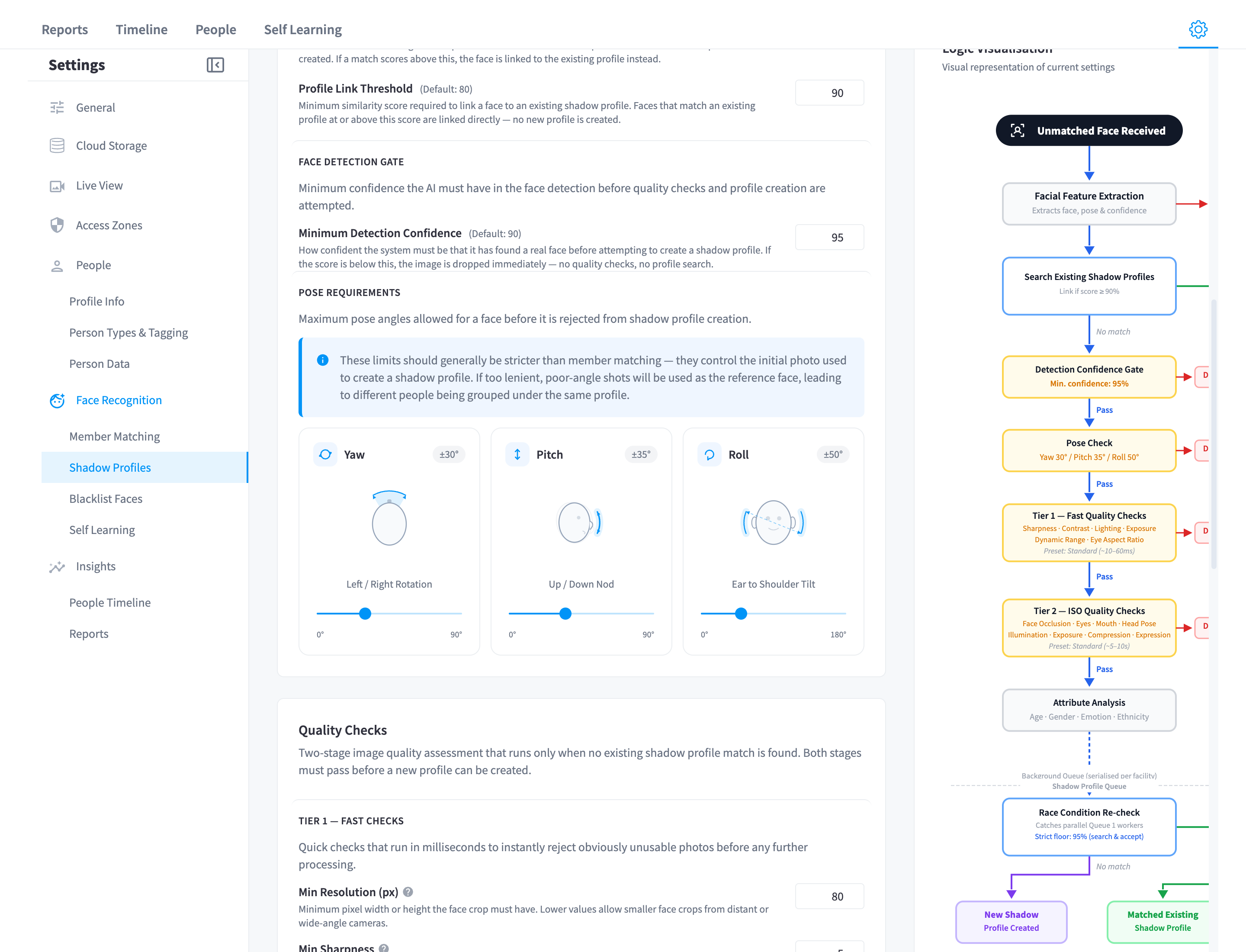
Figure 3: Shadow Profiles — quality preset, thresholds, and the shadow-profile flow diagram
| Setting | Default | What it does |
|---|---|---|
| Profile Link Threshold | 80% | Minimum similarity to link a detection to an existing shadow profile — the "same visitor as yesterday" decision |
| Duplicate Prevention Threshold | 90% | Similarity at which the final race-condition re-check treats a "new" face as an already-created profile |
| Minimum Detection Confidence | 90% | Confidence the AI must have that the image contains a real face before profile creation is attempted |
| Unidentified pose limits | Yaw 30° / Pitch 35° / Roll 60° | Maximum head angles for a photo to seed a new profile — deliberately stricter than matching, since this photo becomes a long-lived reference |
| Quality preset | Balanced | Drives the two-tier photo quality gates below |
The quality preset (Lenient / Balanced / Strict) sets the bar for the Tier 1 — Fast Quality Checks ("Sharpness · Contrast · Lighting · Exposure · Dynamic Range · Eye Aspect Ratio", ~10–60 ms) and Tier 2 — ISO Quality Checks ("Face Occlusion · Eyes · Mouth · Head Pose · Illumination · Exposure · Compression · Expression", ~5–10 s). Every underlying value is individually adjustable — minimum resolution, sharpness, contrast, lighting symmetry, exposure bounds, dynamic range, eye aspect ratio, and the full ISO set including an IR/night-vision filter and a minimum overall quality score — but individual overrides here are support-guided territory; the presets cover virtually all real facilities.
The symptom table:
| Symptom | Likely fix |
|---|---|
| Same visitor gets a new "Unsure" profile every day | Quality preset too strict for your lighting, or Profile Link Threshold too high — try Lenient quality first |
| Two different people merged into one shadow profile | Raise the Profile Link Threshold / go Strict |
| Explosion of junk profiles (shadows, reflections, screens) | Raise Minimum Detection Confidence; blacklist static culprits |
Self Learning
Controls the visit-correlation pipeline. Only visible when Enhanced AI Analysis is enabled.
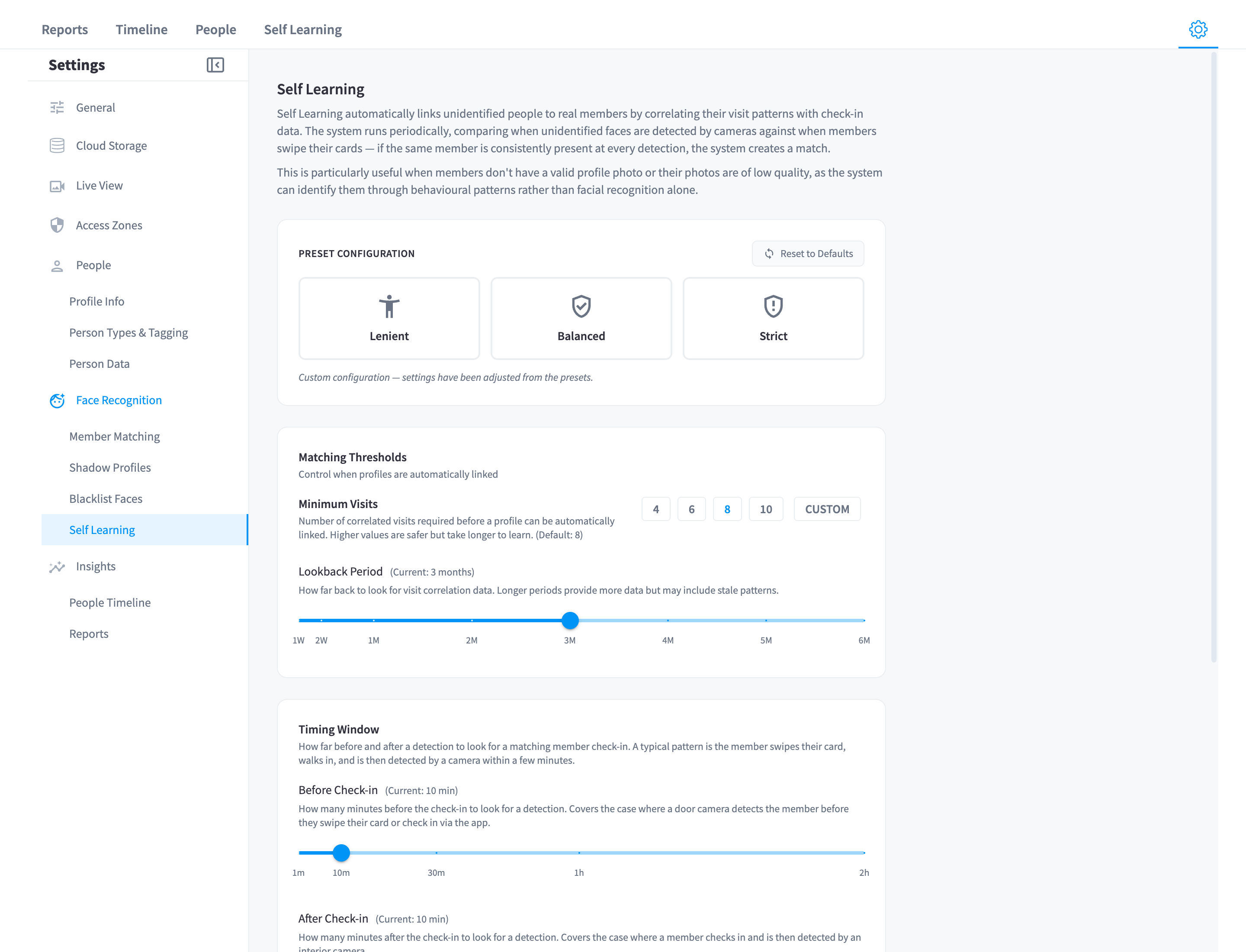
Figure 4: Self Learning settings — evidence requirements and validation checks
| Setting | Balanced default | What it does |
|---|---|---|
| Minimum visits | 8 | Correlated visits required before a link decision — the evidence bar |
| Lookback period | ~2 months (60 days) | How much history the correlation considers |
| Timing window | ±10 minutes | How close a detection must be to a check-in to count as correlated |
| Gender check | on | Detected attributes must align with the member record, else → Pending Review |
| Age check | off (tolerance 10 years) | Optional second validation |
Preset intuition: Lenient links faster on less evidence (good for small facilities where staff review the queue anyway); Strict demands more visits and tighter validation (good where an automatic mislink is unacceptable). Remember the structural safeguard that no preset changes: the correlation must point to exactly one member, or the result is No match.
What you can't tune
For completeness — parts of the pipeline that are fixed by design:
- The blacklist check threshold (95%) — see Blacklist.
- The auto-shadow-photo rules (99%+ similarity, small rotating cap per person, cooldowns) that keep recognition fresh — see Self Learning.
Related pages
- How it works — the pipeline these settings drive
- Self Learning — the review console
- Troubleshooting — recognition problems and their usual causes