
AI Insights & People
AI Insights & People is Performance Hub's people intelligence layer. It runs on the same Edge Processor appliance as the CCTV / VSaaS module and turns raw camera footage into answers about people: who visited, when, for how long, which zones they used, and whether their membership actually allows them to be there.
Where the CCTV module records and plays back video, AI Insights & People identifies and understands the people in that video:
- Face recognition and member matching. Detected faces are matched against your synced member list — automatically, with visit-assisted confirmation when someone has just checked in.
- A people timeline. Every detected individual — identified member or not — on a scrubbable timeline with classification filters like "Facility Members", "Unsure", "Expired", "Card Sharing" and "Tailgating".
- Person profiles with AI insights. Visit counts, average duration, visit patterns, demographics, demeanor, and plain-English risk/engagement insights per person.
- Reports. Zone activity heatmaps, busiest and under-used zones, sentiment trends, demographics, and zone access violations.
- Self Learning. The system links unidentified visitors to real members by correlating camera detections with check-in times — useful when member photos are missing or poor quality.
- Access zones. Map cameras to named zones, tie zones to membership plans and access hours, and surface members detected where their plan doesn't permit.
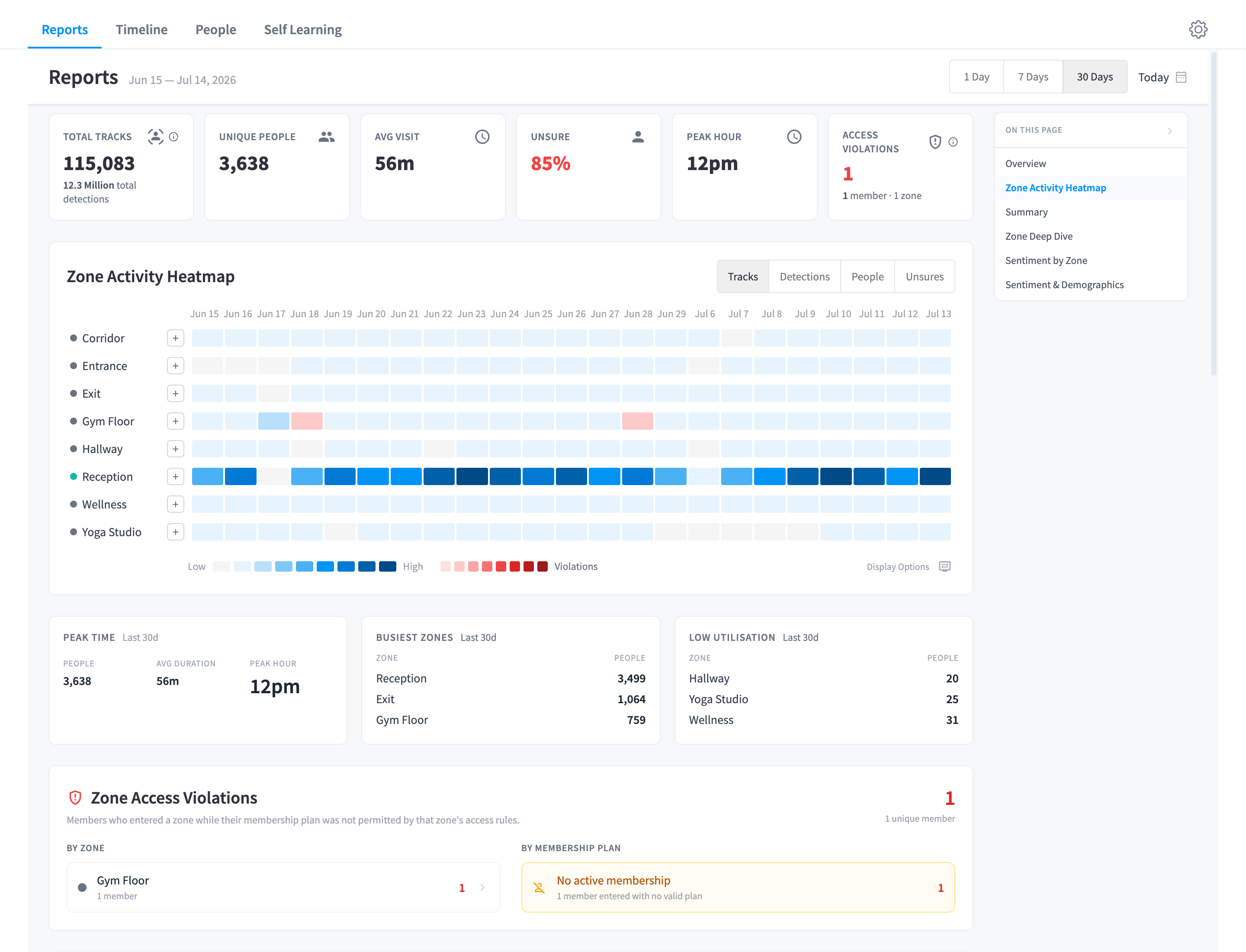
Figure 1: The Reports view — KPIs, the Zone Activity Heatmap, busiest/low-utilisation zones, and Zone Access Violations for the Lower Manhattan facility
Quick reference
| Menu location | AI Insights & People in the Performance Hub sidebar (group: Facility Operations) |
| Main views | Reports · Timeline · People · Self Learning · Settings |
| Requires | The CCTV module (which itself requires Device Management), with the People facility feature enabled |
| Enhanced analysis | Some capabilities (Self Learning, richer AI metadata) additionally require Enhanced AI Analysis — a toggle in the shared CCTV Settings |
| Hardware | The same Edge Processor that powers CCTV — no extra appliance |
The main views
| View | What it's for |
|---|---|
| Reports | Facility-level analytics: KPIs, zone activity heatmap, zone deep dives, sentiment and demographics — see Reports |
| Timeline | Every detected individual across your cameras on a horizontal timeline, with classification filters and bulk actions — see People timeline |
| People | Your synced member list with photos, profiles, tags, and per-person activity logs — see People & profiles |
| Self Learning | The automatic visit-correlation pipeline and its review queue — see Self Learning |
| Settings | People, Face Recognition, Insights, and Access Zones settings — shared with the CCTV Settings sidebar; see Settings |
The CCTV / AI Insights boundary
AI Insights & People is a facility feature that requires the CCTV module — the two share one appliance, one Settings surface, and one camera fleet:
- CCTV owns cameras, recording, cloud storage, live view, the video timeline, retention, and sharing. Those are documented in the CCTV / VSaaS module docs.
- AI Insights & People owns everything from identifying people onward: face recognition, member matching, people profiles, the people timeline, reports, self learning, access zones, and the blacklist.
- The Settings sidebar serves both products. The General, Cloud Storage, and Live View groups belong to CCTV; the Access Zones, People, Face Recognition, and Insights groups belong to this feature. This module's Settings page explains the split.
- One CCTV-owned toggle matters a great deal here: Enhanced AI Analysis (Settings → General). It "Generates richer metadata including heatmaps, path tracking, and self learning. Disabling this will also turn off automatic profile matching."
Where to start
- Getting started — enable the feature, turn on People Tracking per camera, connect your member sync.
- How it works — the identification pipeline: how a face becomes an identified member, an "unsure" visitor, or a blacklist drop.
- People timeline — the day-to-day view of who is in your facility.
Requirements
- The CCTV module enabled and operating — an Edge Processor with cameras added and recording.
- The People facility feature enabled for your facility (arranged through your Performance Hub account manager).
- People Tracking enabled on the cameras you want analysed — a per-camera setting in Cameras & devices.
- A member sync from your member management system (via the Partner integration), so detected faces have member records and check-ins to match against. The feature still works without one — visitors appear as unidentified people — but member matching, self learning, and access-zone rules all depend on synced members, plans, and check-ins.
- For Self Learning and richer analytics: Enhanced AI Analysis turned on in CCTV Settings → General.
AI capacity: running person detection alongside recording reduces the number of camera feeds an appliance can handle — roughly half the VSaaS-only capacity. See The hardware for per-model guidance.
Documentation map
| Section | Pages |
|---|---|
| Platform | How it works · Getting started |
| Guides | People timeline · People & profiles · Reports · Self Learning · Access zones · Blacklist |
| Administration | Settings · Face recognition tuning · Security & privacy · Integrations & MCP |
| Reference | Reference · Troubleshooting · Common questions |
| Related modules | Display Screens: Smart Displays, such as a gym leaderboard or a lobby welcome built from arrivals your AI Agent reads |