
Self Learning
The Self Learning tab (AI Insights & People → Self Learning) is the console for the automatic identification pipeline. In the page's own words, it "Automatically links unidentified people to real members by correlating visit patterns with check-in data. Useful when members don't have valid profile photos or their photos are of low quality."
Where face matching answers "does this face look like a member's photo?", Self Learning answers a different question: "does this person's attendance pattern match exactly one member's check-in pattern?" It's how the system identifies members the camera can never match — no photo, or one too poor to pass validation.
Self Learning requires Enhanced AI Analysis to be enabled in CCTV Settings → General. With it off, the correlation runs stop and the Self Learning settings section is hidden.
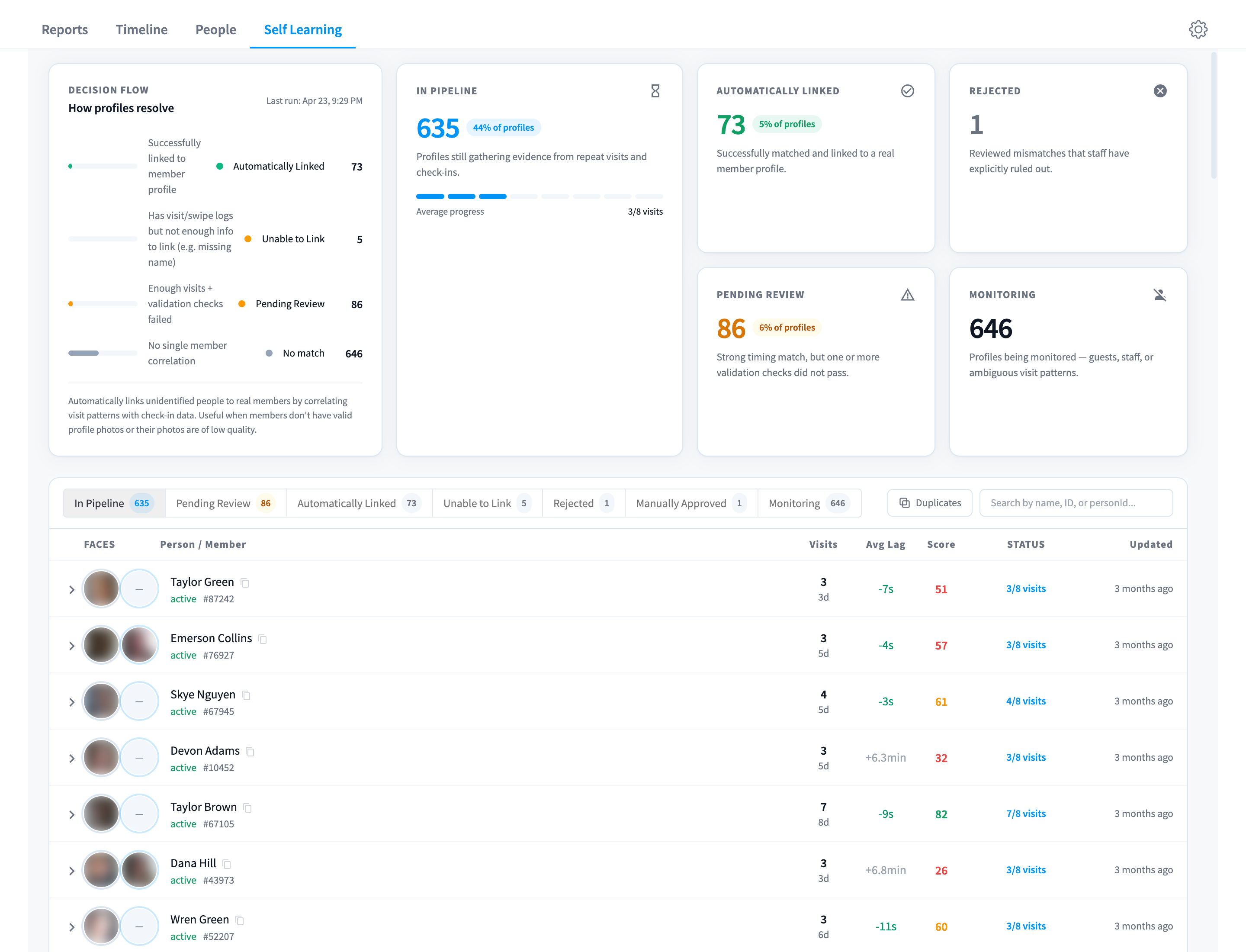
Figure 1: The Self Learning view — the Decision Flow card, summary counts, and the profile queue
How a profile resolves
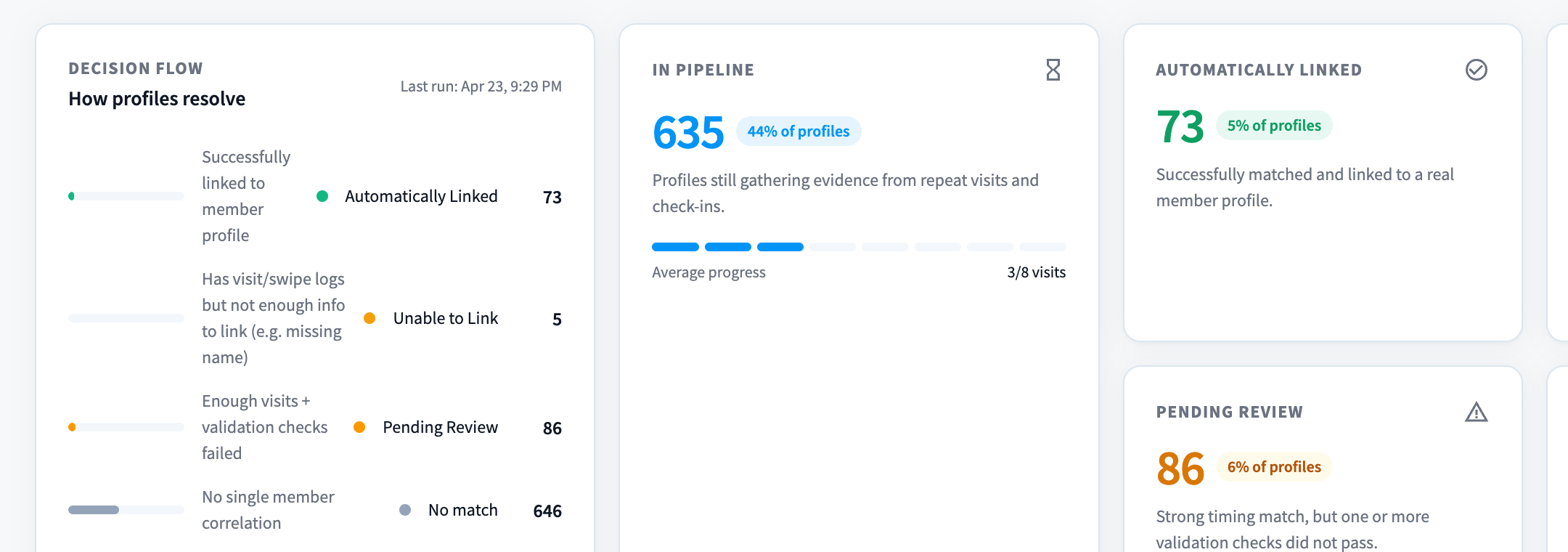
Figure 2: The Decision Flow card — "How profiles resolve", with the timestamp of the last correlation run
The Decision Flow card summarises the four outcomes, exactly as the UI lists them:
| Condition | Outcome |
|---|---|
| "Successfully linked to member profile" | Automatically Linked |
| "Has visit/swipe logs but not enough info to link (e.g. missing name)" | Unable to Link |
| "Enough visits + validation checks failed" | Pending Review |
| "No single member correlation" | No match |
Under the hood, each correlation run (the "Last run:" timestamp on the card) does the following for every unidentified profile:
- Correlate the profile's detection times against member check-ins over the lookback period, using a timing window around each check-in (default ±10 minutes).
- Count the evidence. The profile needs the configured minimum number of correlated visits — default 8 on the Balanced preset. Profiles with some evidence (3+) but below the minimum stay In Pipeline: "Profiles still gathering evidence from repeat visits and check-ins." The pipeline card shows "Average progress" as "N/M visits".
- Demand exactly one candidate. If the visits correlate with more than one member — a couple who always arrive together, for instance — the result is No match. The system will not guess between candidates.
- Validate. With one candidate and enough visits, validation checks run: gender alignment between the profile's detected attributes and the member record (on by default), and optionally an age tolerance check. Pass → Automatically Linked. Fail → Pending Review: "Strong timing match, but one or more validation checks did not pass."
Each record carries a confidence score built from visit count, the number of unique days, and the average lag between check-in and detection (a tight, consistent lag scores highest).
All thresholds — minimum visits, lookback, timing window, and validation checks — are configurable with Lenient / Balanced / Strict presets in Settings → Face Recognition → Self Learning.
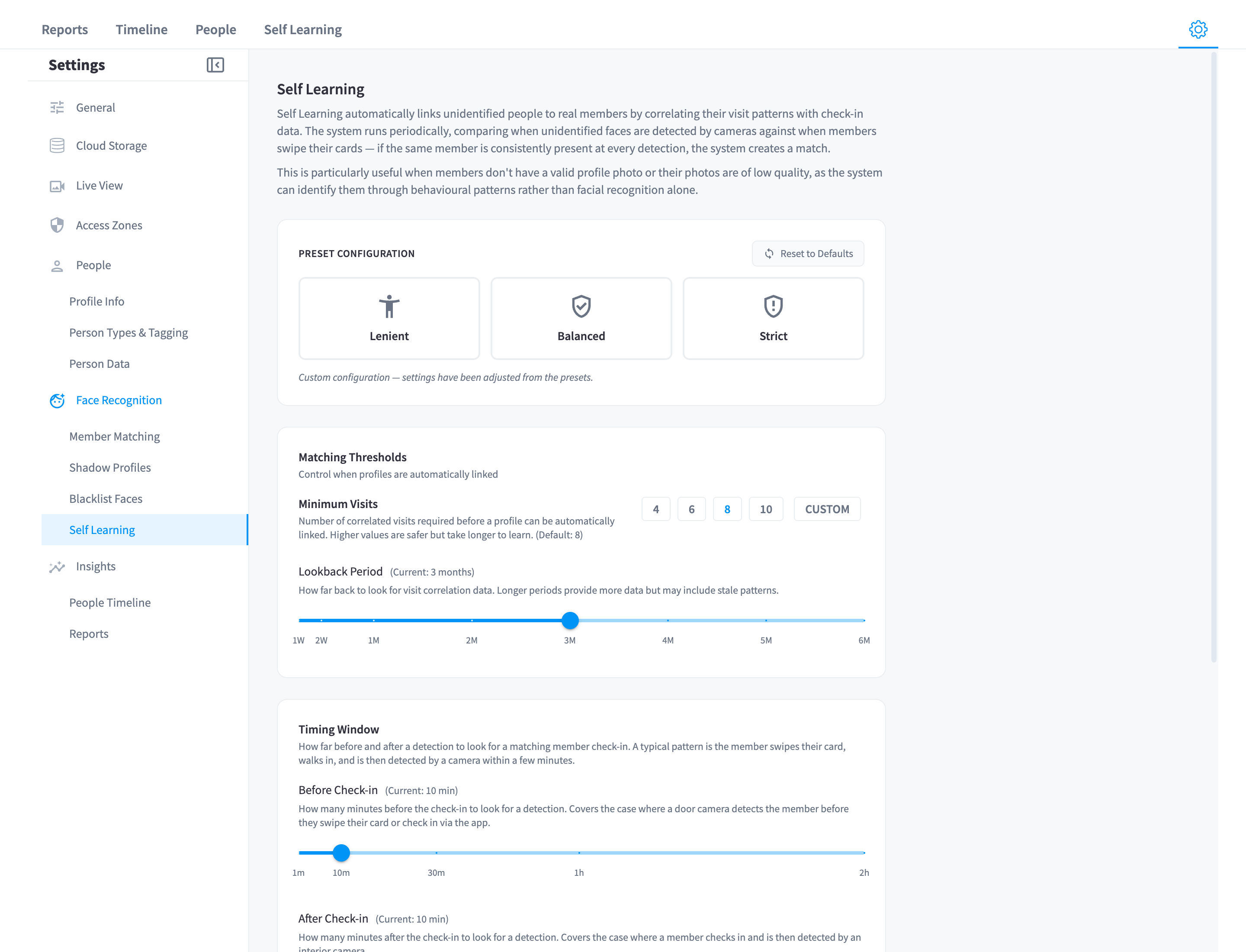
Figure 3: The Self Learning settings — presets, minimum visits, lookback period, timing window, and validation checks
The summary cards
| Card | Meaning (UI copy) |
|---|---|
| In Pipeline | "Profiles still gathering evidence from repeat visits and check-ins." |
| Automatically Linked | "Successfully matched and linked to a real member profile." |
| Pending Review | "Strong timing match, but one or more validation checks did not pass." |
| Rejected | "Reviewed mismatches that staff have explicitly ruled out." |
| Monitoring | "Profiles being monitored — guests, staff, or ambiguous visit patterns." |
The queue
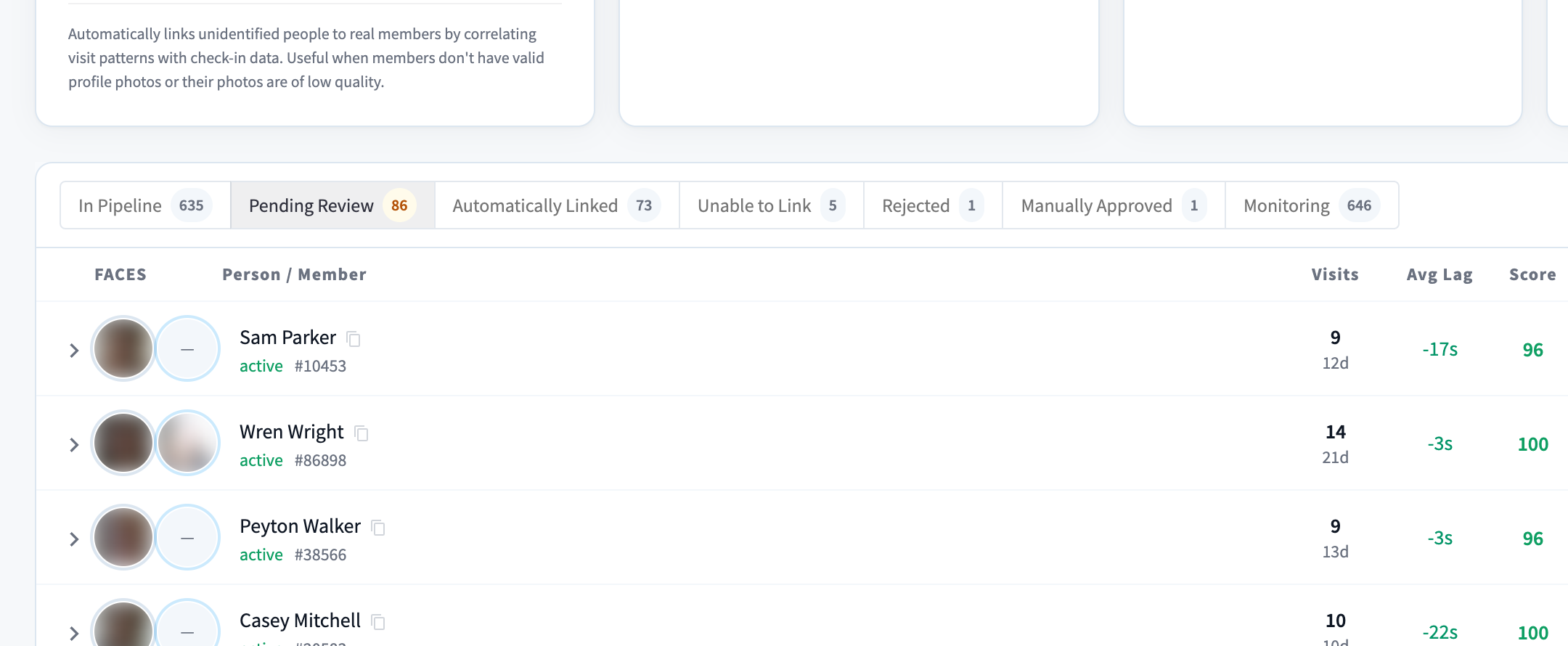
Figure 4: The queue — faces, candidate member, visits, average lag, confidence score, and status
Tabs split the queue by state: In Pipeline, Pending Review, Automatically Linked, Unable to Link, Rejected, Manually Approved, and Monitoring. A search box ("Search by name, ID, or personId...") narrows large queues, and a "Duplicates" button on the pipeline tab surfaces suspected duplicate shadow profiles worth merging first — duplicates split the visit evidence and slow everything down.
Table columns: Faces (the profile's detection photos), Person / Member (the shadow profile and its candidate member), Visits, Avg Lag (check-in to camera detection), Score, Status, Updated. Row statuses include "Pipeline", "Pending Review", "Automatically Linked", "Unable to Link", "No Match", "Rejected", plus the transient "Linking..." and "Link Failed" ("Link failed — will retry on next run").
Reviewing pending matches
For each Pending Review row, compare the detection faces against the candidate member's photo and their visit evidence, then:
- Approve — confirms the match and links the profile to the member. Approvals are attributed ("Approved by ").
- Reject — rules it out. The dialog asks for a reason — "Please provide a reason for rejecting this match. This will be recorded for audit purposes." (e.g. "Photos clearly show different people, member data is incorrect, etc."). Rejected profiles won't be re-proposed for the same member.
Two more actions round out the workflow:
- Link — for Unable to Link rows, a manual search dialog lets you pick the right member yourself; the timing evidence is there, the automatic step just lacked the data to finish.
- Unlink — reverts an automatic link. The confirmation is precise about what it does: "Are you sure you want to unlink this profile? The face data will remain merged with the member but the self-learn record will be reverted." If face data was wrongly merged, follow up in the person's profile.
The other half: keeping recognition fresh
Self Learning also works silently on already-identified people. When a confirmed detection is a near-perfect match (99%+ similarity) and passes quality and pose checks, the system can add it as a shadow photo — capped at a small rotating set of 6 per person, with cooldowns so one visit doesn't flood the set. That's why profiles accumulate photos labelled "Auto-added by self-learning" (People & profiles) — and why recognition keeps working as haircuts, beards, and glasses change.
Practical tips
- Work the Pending Review queue weekly. Every approval permanently improves identification; every unreviewed row is a member being counted as "Unsure" in your reports.
- Merge duplicates first. Check the "Duplicates" view before reviewing — merging consolidates visit evidence and often pushes pipeline profiles straight over the threshold.
- A large Unable to Link tab points at data quality in your member system — typically missing names on check-in-capable records.
- Couples and training partners who always arrive together are the classic No match case. Identify one of them manually and the ambiguity disappears for the other.
Related pages
- How it works — where Self Learning sits in the pipeline
- Face recognition tuning — the Self Learning presets and thresholds
- People & profiles — manual identify and merge