
CCTV (Video surveillance as a service)
The CCTV module is Performance Hub's video surveillance as a service (VSaaS) platform. An Edge Processor appliance at your facility ingests your IP cameras, records around the clock, and uploads encrypted footage to cloud storage in a region you choose — while live view streams straight from the appliance to your browser.
It is an open-architecture system: it works with the cameras you already have. Any camera that can produce a standard network video stream can be added — no proprietary cameras, no NVR to maintain, no DVR hard drives to swap.
- Record everything, keep what matters. Motion-triggered or continuous recording per camera, automatic cloud upload, retention policies you control, and one-click retention of incident footage that is never auto-deleted.
- Watch from anywhere. Live video walls, a scrubbing timeline with a timelapse filmstrip, and a searchable recordings browser — in your browser, with nothing to install and no firewall changes.
- Built for people intelligence. The same appliance can run AI person detection on your camera feeds. Face identification and people analytics are part of the separate AI Insights & People feature, which runs on top of this module.
- Share without creating accounts. Time-limited guest links (for police, insurers, or contractors) scoped to just the sections you choose, with a full audit trail of who viewed what.
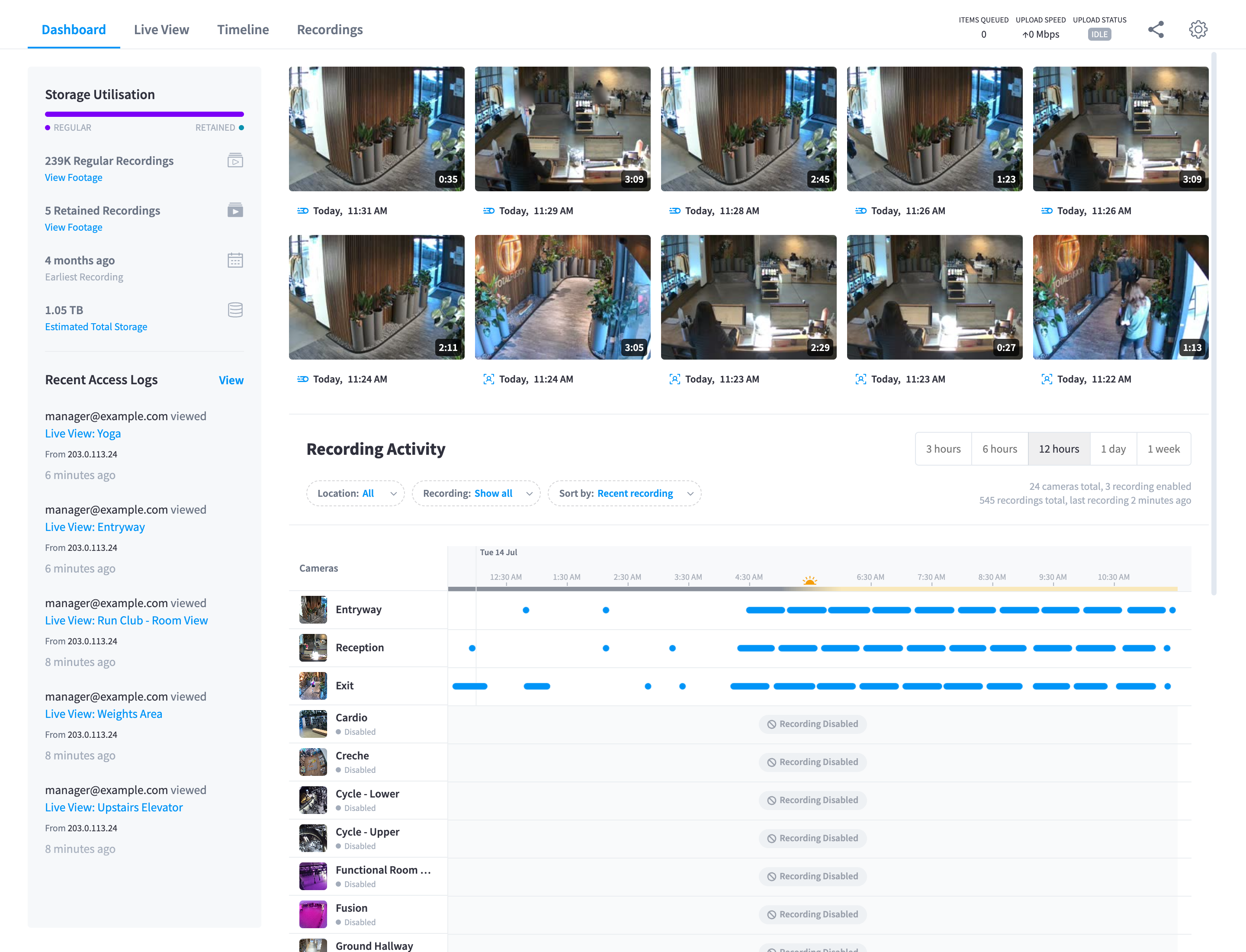
Figure 1: The CCTV module — storage utilisation, recent recordings, access logs, and per-camera recording activity at a glance
What you get
| Piece | What it is |
|---|---|
| The Edge Processor | A turnkey AI appliance (the hardware) that arrives pre-imaged — connect power and network, claim it by serial number |
| Your cameras | Your existing IP cameras, added by stream URL — or cloud-native cameras purchased through Performance Hub |
| Cloud storage | Encrypted recordings, timelapse, and metadata in your choice of 16 storage regions |
| This module | Dashboard, Live View, Timeline, Recordings, sharing, and settings — the whole product, in Performance Hub |
| Integrations | MCP tools for real-time programmatic access — with the AI Agent appliance as the preferred integration path |
It's a turnkey product: the appliance arrives flashed and ready, claiming it takes minutes, and adding your first camera is a single dialog with a built-in stream test.
What it's for
- Security coverage of entrances, floors, receptions, and back-of-house — recorded to the cloud, so footage survives theft or damage to on-site equipment.
- Incident response. Scrub the timeline to the moment, retain the recording so it can't age out, and share a time-limited link with police or your insurer.
- Operational awareness. Live video walls on a wall-mounted screen or in a tab; the dashboard's recording activity strip shows exactly when and where motion happened overnight.
- A foundation for people intelligence — occupancy, visit patterns, member recognition — via the AI Insights & People feature (documented separately).
The CCTV / AI Insights boundary
Two products share this surface, and it helps to know which is which:
- CCTV (this module) owns everything from the camera to your screen: ingest, recording, cloud storage, live view, timeline, recordings, retention, sharing, and the shared Settings areas (General, Cloud Storage, Live View).
- AI Insights & People (a facility feature that requires CCTV) owns everything from identifying people onward: face recognition, member matching, people profiles, people timelines, and reports. Its settings appear in the same Settings sidebar (the People, Face Recognition, and Insights groups) but are documented separately.
Where a CCTV screen surfaces a People element — the "AI Detections" recordings filter, people counts in the video player — these docs note it and move on.
Where to start
- Getting started — unbox the Edge Processor, claim it, add your first camera.
- Live view and Timeline & playback — day-to-day watching and investigating.
- How it works — the architecture, for the technically curious.
Requirements
- The CCTV module enabled for your facility (it requires the Device Management module).
- An Edge Processor appliance — supplied as part of the product.
- IP cameras on the same local network as the appliance, able to produce a standard network stream.
- Ordinary outbound internet at your facility for cloud upload and remote management — no open inbound ports and no port-forwarding are needed for cloud access. (For the fastest live view when browsing remotely, allowing the appliance's peer-to-peer streaming port is recommended — see How it works.)
Documentation map
| Section | Pages |
|---|---|
| Platform | How it works · The hardware · Getting started |
| Cameras & recording | Cameras & devices · Recording |
| Watching & investigating | Live view · Timeline & playback · Recordings · Retain & archive · Sharing & guest access |
| Administration | Storage & retention · Device health & monitoring · Integrations & MCP · Access control & permissions · Security & privacy |
| Reference | Reference · Troubleshooting · Common questions |