
Relay Wiring Guide
This guide is for the technician or electrician wiring the Door & Gate Controller to door hardware — electric strikes, electronic latches, magnetic locks ("maglocks"), and gate controllers. It covers the relay terminals, fail-secure and fail-safe wiring patterns, exit buttons, and emergency exit devices.
The relay is the only terminal interface used by Door & Gate Access. The other terminal blocks on the panel (Input/DI, RS485, RS232, Analog/ADC) are reserved — they're not currently used by the application, and may be enabled in future updates or used by special implementation features. Leave them unwired.
How the relay works
The controller has a double-pole, double-throw (DPDT) relay — two independent switched circuits (poles) that change over together. Each pole has three terminals:
- COM — common terminal
- NO — normally open contact (open at rest, closes when the relay energises)
- NC — normally closed contact (closed at rest, opens when the relay energises)
At rest, COM1–NC1 and COM2–NC2 are connected. When an unlock is granted, the relay energises: COM1–NO1 and COM2–NO2 close (and the NC contacts open) for the door's configured hold time (1–30 seconds, default 10 — set per door in the door's Configuration tab, see Doors). After the hold time the relay returns to rest.
Relay terminal pinout
The relay terminals are on the Output block of the terminal panel, numbered 1–6 left to right:
| Terminal | Name | Function |
|---|---|---|
| 1 | NC2 | Pole 2 — normally closed |
| 2 | COM2 | Pole 2 — common |
| 3 | NO2 | Pole 2 — normally open |
| 4 | NC1 | Pole 1 — normally closed |
| 5 | COM1 | Pole 1 — common |
| 6 | NO1 | Pole 1 — normally open |
Both poles switch in unison. Wire your lock to pole 1; pole 2 is available for a second device that should switch at the same time — a second lock, a gate motor's trigger input, or a sounder/indicator.
Relay ratings
| Load type | Maximum |
|---|---|
| DC load | 30V, 3A |
| AC load | 125V, 0.5A |
The relay is a dry contact — it switches power, it doesn't supply it. Your lock must be powered by a separate lock power supply. Never power the lock from the controller's own supply or PoE splitter; this will damage equipment. For loads close to or above the relay rating (e.g. large maglocks, motorised gates), don't switch the load directly — use the relay to drive a secondary relay or the gate controller's low-current trigger input instead.
Fail-secure vs fail-safe
The wiring pattern depends on which kind of locking hardware you have:
| Fail-secure | Fail-safe | |
|---|---|---|
| Examples | Electric strikes, electronic latches | Magnetic locks, fail-safe strikes |
| Powered state | Powered = unlocked | Powered = locked |
| On power loss | Door stays locked | Door releases |
| Relay contact to use | COM + NO | COM + NC |
If you use fail-secure locks, make sure there is another physical means of unlocking the door (a key override) in case of an extended power or connectivity outage. If you use fail-safe locks, use a battery-backed lock power supply so a brief power blip doesn't release the door.
Wiring a fail-secure strike or latch
Use COM1 + NO1, so the lock only receives power while the relay is energised (during an unlock):
- Lock power supply + → COM1
- NO1 → lock +
- Lock − → lock power supply −
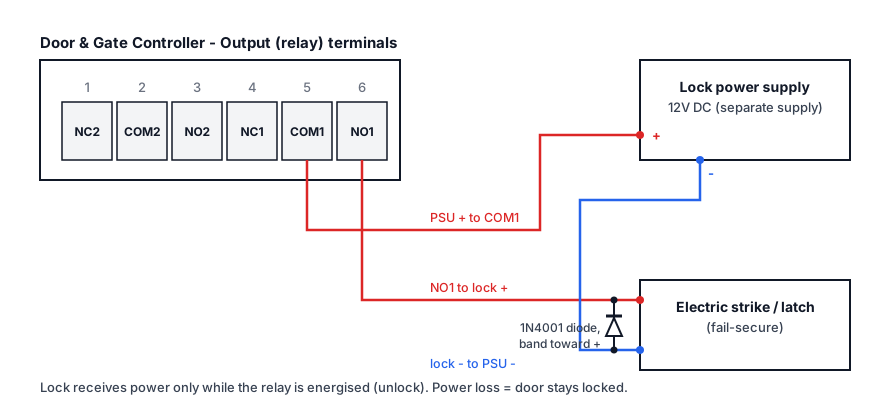
Figure 1: Fail-secure electric strike on COM1/NO1 — powered only during unlock
Adding a push-to-exit button
For free egress on the inside of the door, wire a normally-open push-to-exit button in parallel with the COM1–NO1 contact. Pressing the button bridges the contact and powers the strike, releasing the door without involving the controller:
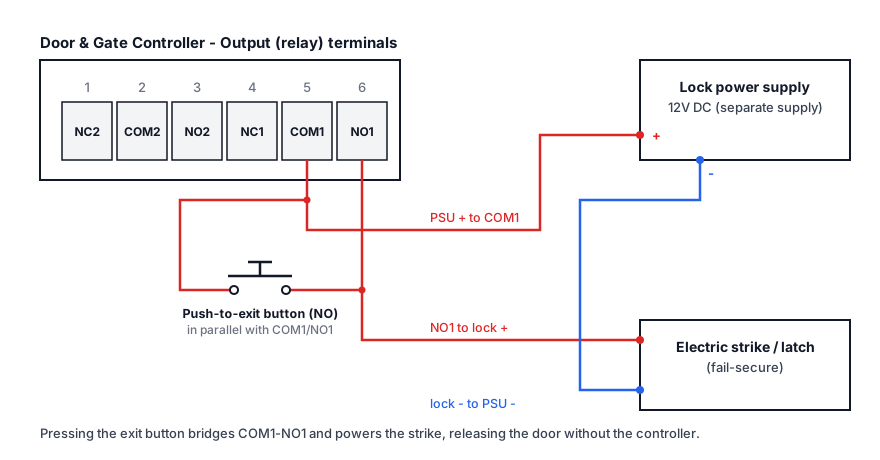
Figure 2: Push-to-exit button in parallel with the relay contact
Exits triggered by a hardwired button bypass the controller, so they don't appear in the Access Logs.
Wiring a fail-safe maglock
Use COM1 + NC1, so the lock is powered (locked) at rest and the relay cuts power to release it:
- Lock power supply + → COM1
- NC1 → maglock +
- Maglock − → lock power supply −
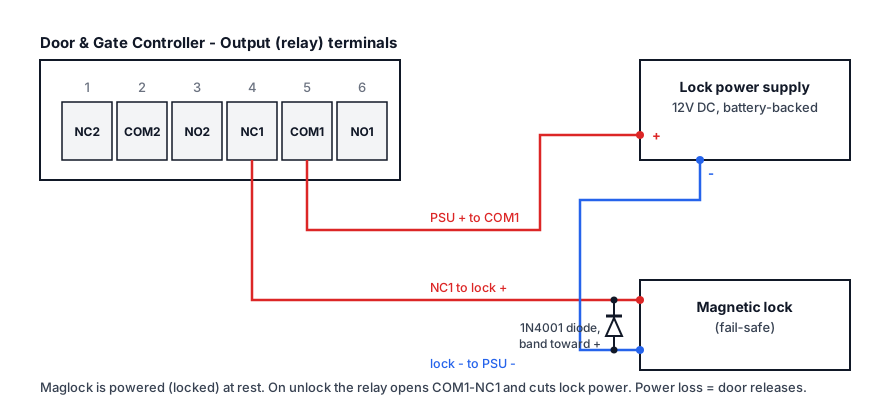
Figure 3: Fail-safe maglock on COM1/NC1 — power is cut during unlock
Adding an emergency exit device
Maglocks hold the door shut even in an emergency, so most codes require an emergency break-glass or fire-trip device that releases the door independently of the access control system. Wire it in series with the lock's power feed, so activating it cuts power to the maglock no matter what the controller or relay is doing:
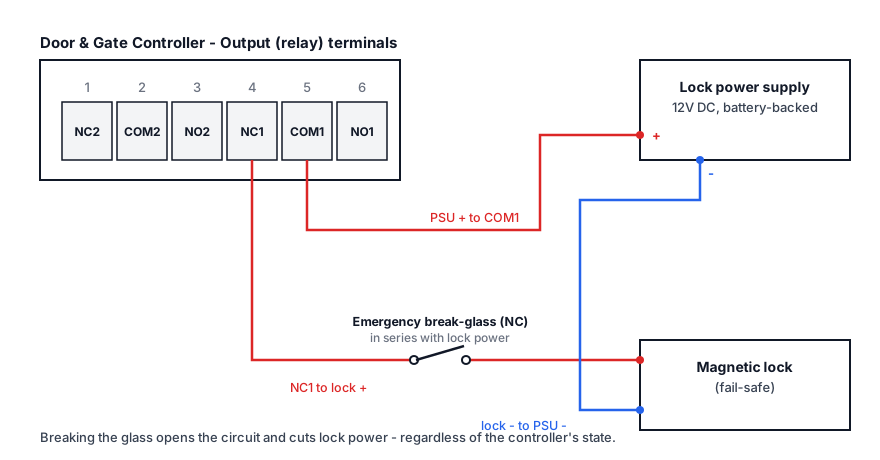
Figure 4: Emergency break-glass in series with the maglock supply
Fire safety and egress are governed by your local building and fire codes. Where a fire alarm control panel is present, lock power is typically routed through (or dropped by) the fire panel so an alarm releases all fail-safe locks. Have the egress design signed off by a qualified installer — the controller switches the lock, but the life-safety circuit must work without it.
Protecting against voltage spikes (DC locks)
Strikes and maglocks are inductive loads — when power is cut, the collapsing magnetic field produces a voltage spike that can arc the relay contacts and shorten equipment life. For DC locks, fit a snubber diode (a silicon rectifier diode such as a 1N4001) directly across the lock's terminals, as close to the lock as practical:
- Diode cathode (the end with the band) to the lock's + terminal
- Diode anode to the lock's − terminal
The diagrams above show the diode placement.
Polarity matters. A diode fitted backwards is a dead short across the lock supply and can damage the power supply. Double-check the band faces the + side before powering on. Many strikes and maglocks ship with a diode (or MOV) in the bag — use it.
Gates and other controllers
Motorised gates, turnstiles, and barrier arms usually have their own controller with a low-voltage trigger input that opens the gate when momentarily closed. Wire the trigger input across COM1 + NO1 (no lock power supply involved — the gate controller provides its own sensing voltage, within the relay's ratings). Set the door's hold time short (1–2 seconds) so the trigger acts like a momentary button press.
Before you finish
- Test with the door open so you can't lock yourself out while wiring.
- Verify the wiring without the controller — see Test the wiring with a jumper.
- Send a test unlock from the dashboard (door card → Open) and confirm the relay clicks, the lock releases, and the door re-locks after the hold time.
- Check the event appears in the Access Logs.
Related pages
- Hardware Troubleshooting — relay and lock diagnostics
- Power & Connectivity — powering the controller itself
- Doors — hold time, door open sound, and other per-door settings