
Connecting to Performance Hub
What separates your AI Agent from a generic chatbot is that it's plugged into your business. Through Performance Hub's MCP connection, the agent can look up members, check bookings and attendance, review device health, pull reports — the same operational data you see in Performance Hub, available to the agent in conversation and in its automations.
You control exactly how much of Performance Hub the agent can reach: which facilities, which modules, even which individual capabilities. This page explains the options.
MCP access is configured in the device drawer under Configuration → MCP access.
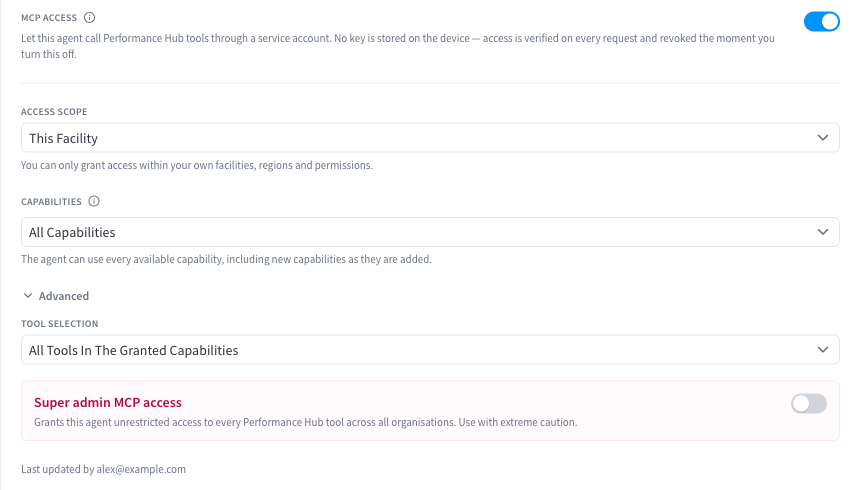
Figure 1: The MCP access section — scope, capabilities, and the enable toggle
Quick reference
| Setting | Default | Options |
|---|---|---|
| MCP access | Enabled | On / off |
| Scope | This facility | Specific facilities · Regions · Entire organisation |
| Capabilities | All modules | All · Choose specific modules · All except selected modules |
| Tool-level control | Off | Include or exclude individual tools (advanced) |
Recommendation: Leave MCP access turned on (the default). The connection is what makes the agent genuinely useful for your business, and out of the box it's safely scoped to just the facility the device is paired to. If you later need the agent to work with wider data — several locations, a region, or the whole organisation — adjust the scope below rather than working without the connection.
What the connection gives the agent
MCP (Model Context Protocol) is the open standard the agent uses to call Performance Hub. In practice it means you can ask things like:
- "How many members visited this week compared to last?"
- "Which door controllers are offline right now?"
- "Find the member whose payment failed yesterday and summarise their account."
…and the agent answers from live Performance Hub data, scoped to what you've granted it. The same connection powers automations — a morning summary of yesterday's attendance, a weekly device-health digest — and the built-in operational runbook described in Skills.
The agent acts as its own identity in Performance Hub (a service account tied to the device), not as any particular person. Every call it makes is checked against the access you've granted here, on the Performance Hub side — the grant is enforced centrally, not on trust.
Scope — which facilities the agent can see
- This facility / specific facilities (default: the facility the device is paired to) — the agent sees only the listed facilities. Right for a single-site agent.
- Regions — the agent sees every facility in the selected countries/regions. Useful for a regional manager's agent.
- Entire organisation — everything. Suited to head-office agents doing cross-facility reporting.
You can only grant scope you yourself hold: a facility manager can grant their own facilities, while organisation-wide scope requires an organisation-level administrator to set it.
Capabilities — which modules the agent can use
- All modules (default) — the agent can use every capability available at the facilities in scope. New modules you enable later become available to the agent automatically.
- Choose specific modules — an explicit allow-list. The agent gets exactly these and nothing else, even as your subscriptions change.
- All except selected modules — everything minus an exclusion list. A good middle ground: full utility, with (say) billing carved out.
Tool-level control (advanced)
For fine-grained control, expand the advanced tool options to include or exclude individual tools within the granted modules — for example, allowing member look-ups but excluding member updates. Most facilities never need this; module-level control is the practical grain.
A note on write actions
The grant covers whatever the modules expose — including actions that change data, not just read it, where a module offers them. If you want a strictly informational agent, use the capability modes above to keep it to reporting-oriented modules, or exclude specific tools. And remember the agent confirms significant actions in conversation before taking them.
Turning it off, and revoking access
- Toggle MCP access off and the agent immediately loses its connection to Performance Hub — it keeps working as a general assistant with its files and memory, but can no longer see your business data. Changes (on, off, or scope edits) take effect within moments of saving; nothing needs restarting.
- Removing or resetting the device revokes its credentials entirely.
Who can grant what
Grants are attenuated to the granter: whatever scope and modules you hold at the organisation is the ceiling on what you can hand the agent. If an option is unavailable in the UI, it's because your own role doesn't include it — an administrator with the necessary access can set it instead.
Related pages
- Skills — the operational runbook that puts this connection to work
- Automations & scheduled tasks — unattended jobs that use Performance Hub data
- Access control — who can talk to the agent (a separate question from what the agent can reach)
- Security & privacy