
Access Zones
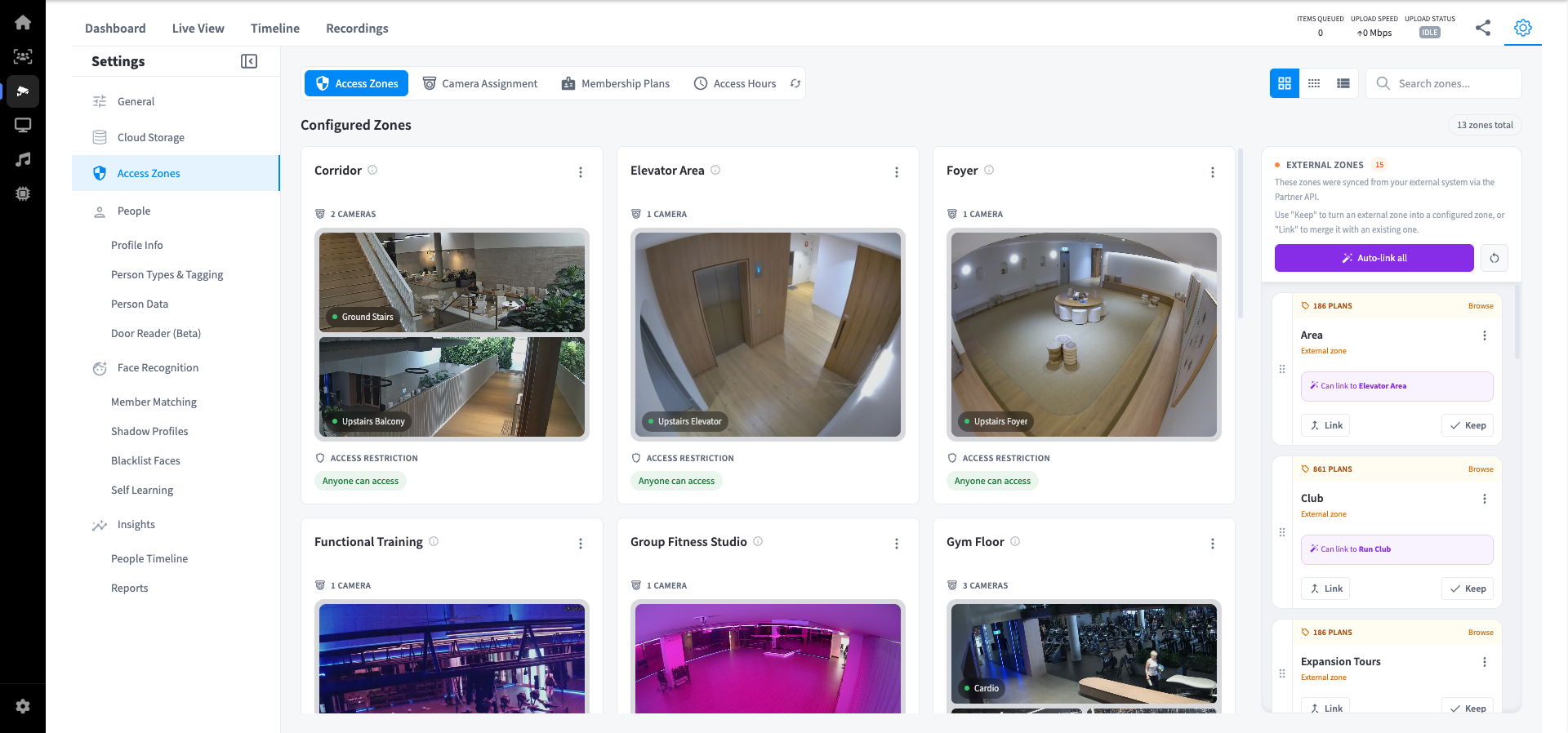
The Access Zones settings page lets you define the physical zones in your facility, assign cameras to them, link zones to membership plans, and manage zone data synced from external systems.
Navigation Tabs
The Access Zones page has four tabs at the top:
| Tab | Description |
|---|---|
| Access Zones | View and manage configured zones |
| Camera Assignment | Assign cameras to zones |
| Membership Plans | Associate membership plans with zones |
| Access Hours | Configure when each zone can be accessed |
Configured Zones
Configured zones are the named areas of your facility that you have set up in Performance Hub. Each zone displays:
- Zone name
- Assigned cameras — thumbnails of cameras covering that zone
- Access Restriction — restrict users by specific tags. Set who can access this zone (e.g. "Anyone can access" or restricted by membership plan).
Use the view options (Grid, Compact, List) and the search bar to navigate zones. Zones can be clicked to open and edit their settings. Use Device Management to move the camera/s to a different zone.
Example Zones
| Zone | Cameras | Access |
|---|---|---|
| Corridor | Ground Stairs, Upstairs Balcony | Anyone |
| Elevator Area | Upstairs Elevator | Anyone |
| Foyer | Upstairs Foyer | Anyone |
| Functional Training | Functional Room View | Anyone |
| Group Fitness Studio | Fusion | Anyone |
| Gym Floor | Cardio, Machines, Weights Area | Anyone |
| Hallway | Ground Hallway, Gym Hallway | Anyone |
| Kids Zone | Creche | Restricted by membership plan |
| Office | Ground Office | Anyone |
| Reception | Ground Reception, WIFI-CAMERA Reception | Anyone |
| Run Club | Run Club Room View | Restricted by membership plan |
| Spin Studio | Cycle Lower, Cycle Upper | Anyone |
| Yoga Studio | Yoga | Anyone |
External Zones
External zones are synced from your Partner system via the Partner API. They appear separately from configured zones and need to be either linked to an existing configured zone or kept as a standalone zone.
| Action | Description |
|---|---|
| Link | Merge the external zone with an existing configured zone that covers the same physical area |
| Keep | Convert the external zone into a standalone configured zone |
| Auto-link all | Automatically links external zones to configured zones based on name similarity |
| Reset all links | Removes all existing links between external and configured zones |
Note: External zones may suggest similar zones they could be linked to. Review these suggestions carefully before confirming.