
Payment Settings
The organisation's Payment Settings hold the payment methods, balance and billing profile for every facility your organisation pays for. They work like a facility's Payment Settings in Billing & Cost Management, shared across facilities: one card and one balance for a group of offices, clinics or stores.
Quick reference
Where to find it: Settings (cog icon) → Organisation Settings → Organisation → Billing → Payment Settings
Who can access: Organisation admins, in Technology Stack organisations
Purpose: Keep a payment method on file, top up the shared balance and check who gets the organisation's statements
When the tab shows
Payment Settings shows only while the organisation's default is Organisation pays for all facilities, now or from the 1st of next month. It doesn't show just because the organisation pays for some facilities as exceptions. When the default is Each facility pays for itself, Organisation Settings > Billing has Overview and Insights only, and each facility that pays for itself manages its own payment settings in Billing & Cost Management.
What's different from a facility's Payment Settings
The sections are the same as a facility's: Payment Methods, Balance & Top-ups and Billing Profile. For the steps, see Payment Settings in Billing & Cost Management. The differences:
- One balance for every facility the organisation pays for. "This balance is shared across your organisation (consolidated billing). Usage from every location draws from the same wallet." Top-ups and auto top-up add to that shared balance.
- The backup reminder covers every facility: "Please add a backup payment method to your organisation to ensure uninterrupted service for every facility."
- Bill-to details and billing contacts come from Organisation Details. In the Billing Profile, the organisation's bill-to details and billing contacts are taken from Organisation Settings > Details. To change them, click Edit in Organisation details, or see Organisation Details.
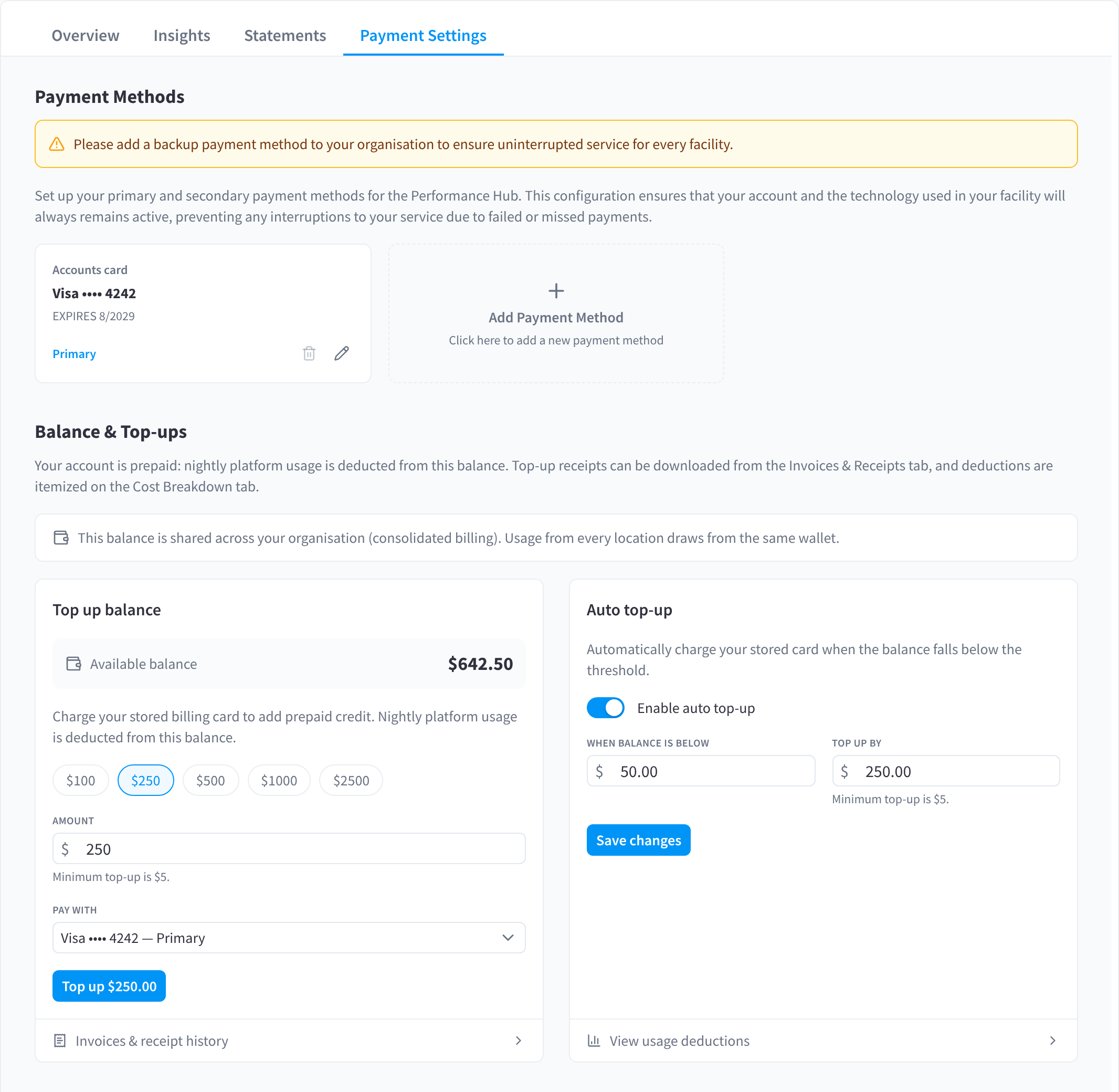
Figure 1: The organisation's Payment Settings: payment methods and a balance shared across facilities
Who gets statements and alerts
The organisation's statements and budget alerts go to the billing contacts in Organisation Details, and to any CC emails in the billing profile. If no contact is marked for billing, every organisation admin gets them.
Settlement method
How the organisation's bill is settled, from a prepaid balance or by monthly invoice, is set by Performance Hub. Your settlement method is part of your agreement with Performance Hub. To change it, contact Support. See Settlement methods.
Related pages
- Payment Settings in Billing & Cost Management: adding cards, topping up and auto top-up, step by step
- Who Pays: who pays by default and exceptions
- Overview & Facilities: the no payment method notice and the organisation balance
- Organisation Details: billing contacts and the billing address