
Security and isolation
On this page
A public site is one app, on one Agent, at one address. A visitor can open that app. They cannot open the Agent, your other apps, or Performance Hub. This page is the one to hand to the person who reviews security before a clinic, a hotel, a retailer or a school puts a page on the internet.
The short version:
- The Agent still makes only outbound connections. A public site does not open an inbound port on your network.
- The app runs in a locked-down container, and the rules are checked again on every request.
- The container can reach the internet only. It cannot reach your private network, the Agent, or Performance Hub.
- HTTPS is on every address. A shared password is stored only as a salted hash.
- A person has to acknowledge the audience before the site can go on the internet. The Agent cannot turn a site on.
How a request is handled
A visitor connects over HTTPS to the nearest Performance Hub gateway. Gateway and relay nodes run in the same regions as our Cloud Agents, and the visitor is routed to the closest node, the way a CDN routes them. The gateway reaches the Agent through a dedicated outbound connection that the Agent opened. The Agent does not accept an inbound connection.
On every request the Agent checks the public-ready rules again. There are more than twenty container rules. Only if every rule still passes is the request sent to the app. The app runs in a locked-down container on its own isolated network.
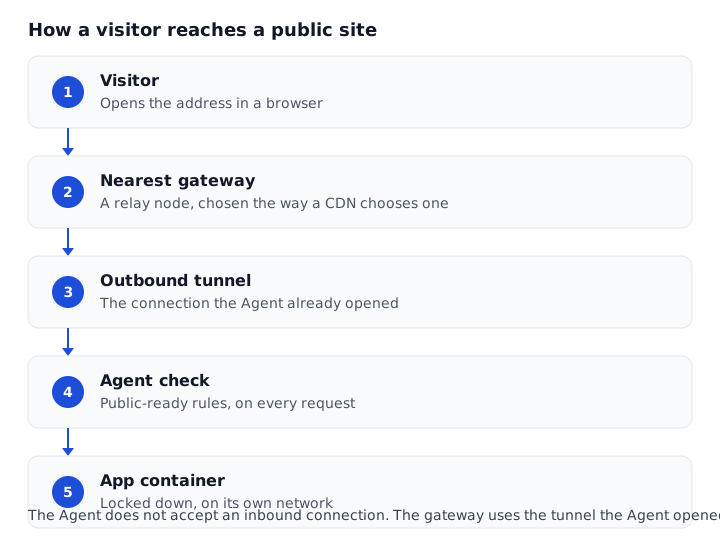
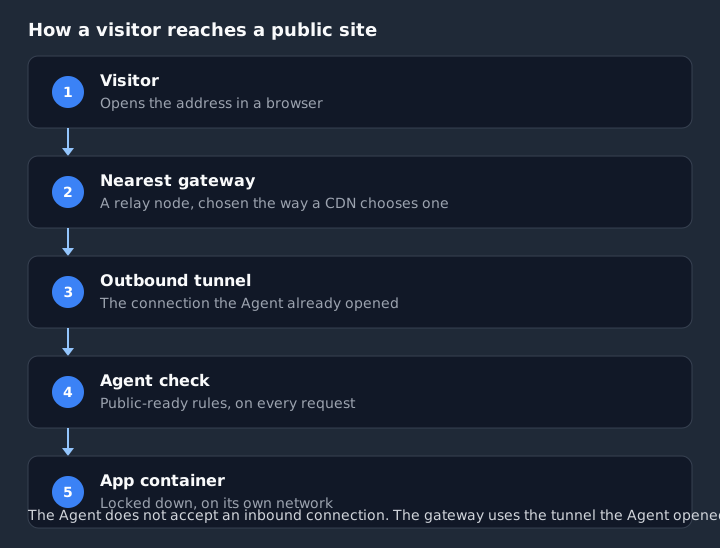
Figure 1: The gateway never connects inbound to the Agent. It uses the tunnel the Agent opened
This is the same outbound-only model as the rest of the Agent. A Physical Agent (on-premise) never requires an open inbound port, port-forwarding or a firewall exception. If the facility can browse the web, the device can serve a public site. See How it works and Security & privacy.
The first time any app on an Agent goes public, the Agent opens that visitor connection. The site may be unreachable for a minute or two while it comes up.
The site's content stays on the Agent. The gateway does not keep a copy. Cloud Agents are not shared between customers. Each Agent has its own connection, and each site address maps to exactly one app on exactly one Agent.
The app runs in a locked-down container
A site is served only while every public-ready rule passes, on every request. An update that breaks a rule is not published by a separate step: the next request fails the check, and visitors see "This site isn't available yet" until it is fixed.
The customer-facing rules, in plain language:
- Public apps run in a locked-down container, so a problem in the app can't reach the rest of your AI Agent or your network.
- The app must be an isolated project, listening only locally, on a dedicated public network and nothing else.
- Other containers in the same project, for example a database, must stay internal. Visitors do not connect to them.
- Privileged mode, host access, extra devices and the container engine socket are refused.
- The app must drop extra privileges and keep the default security profile.
- Files outside the project cannot be mounted. Mounts are read-only, except the app's data folder.
- Memory, CPU and process limits are required when the Agent can enforce them.
- Environment names that would carry Performance Hub or device credentials are refused. The project is scanned for secret-shaped files and keys. The scan names a file. It never shows the secret.
When the check passes, the dialog says "The app is ready for the internet."


Figure 2: Every rule passed. The note appears when this Agent cannot cap memory and CPU
When an Agent cannot cap the app's memory and CPU, the panel adds "This AI Agent can't cap the app's memory and CPU, so a very busy site can slow the agent down." That is one more reason to put a busy site on a Cloud Agent. See Cloud vs on-premise Agents.
When a rule fails, the dialog lists the problems. Put on the internet stays disabled. Ask the agent to fix these sends the list to the Agent. Check again runs the rules once more.


Figure 3: A failed check. The app stays off the internet until the list is clear
If the app crashes, it restarts on its own. The public address keeps serving the running app. There is no separate deploy step.
What a public app cannot reach
The container's network is the control that matters to a reviewer.
A public app can reach the internet only. It cannot reach:
- private or local networks, including the facility LAN and cloud metadata
- other containers, including a database in the same project
- the Agent's own services
- Performance Hub tools, or AI models
- email. The app cannot send mail itself, which also stops it sending spam from the facility's connection
The container does not receive Performance Hub credentials or device credentials. A visitor on a public app cannot spend the facility's AI credits. A public app does not use AI credits at all.
Sensitive paths that an app might otherwise serve are blocked and shown as Site not found. That covers environment files, source-control folders, key files and compose files. A visitor who guesses one of those paths gets the same page as a wrong address. They do not get the file.
The Agent's own management, including chat and the terminal, is not exposed through the public site connection. Public sites do not use Performance Hub sign-in tokens. ph-sites.com is a separate domain, so the site cannot read a Performance Hub sign-in cookie.
Passwords
A password is optional. It is one shared password for the site, not an account for each visitor.
The password is stored only as a salted hash. It is never visible to Performance Hub staff. The check is set up so timing cannot be used to guess it. A trivial or common password is refused, and so is a repeated run of characters, and the site's own name. It must be 8 to 128 characters. The hint in the dialog reads "At least 8 characters. Share it only with people who should see the app."
A visitor who gets it right receives a secure, HTTP-only cookie that lasts 7 days, or until the password changes. Changing the password signs everyone out. The live hint reads "A password is set. Entering a new one signs everyone out, and they need the new password to get back in."
Wrong passwords are throttled. A visitor gets a small number of tries, then a delay that grows, up to 15 minutes. There is also a cap on attempts against the site as a whole. The page says "That password isn't right. Try again." When the visitor is locked out it says "Too many attempts. Try again in {n} minutes."
The password page itself says "This site is password protected." and "Enter the password to continue."

Figure 4: The password is checked before any page of the app is shown

Figure 5: A wrong password. Further wrong attempts are slowed, then locked
Password-protected sites are marked so search engines should not index them. A site that is open to anyone on the internet can be indexed.
Switching the audience to Anyone on the internet removes the password.
How fast a visitor can send requests
The gateway limits how quickly one visitor, or one site, can send requests, and how many requests can be in flight at once. That includes a cap on the Agent. A visitor who goes past the limit may see "Slow down" or "This site is busy".
The largest request body is 25 MB. Anything larger is refused with "Upload too large".
These are limits on the gateway and on the Agent. They keep one visitor, or one busy app, from crowding out the Agent.
HTTPS
Every public address is HTTPS.
ph-sites.comaddresses are HTTPS from the first moment.- A custom domain gets a certificate automatically, usually within a minute or two of the domain connecting, from a public certificate authority. It renews automatically. The owner is warned 14 days before the current certificate expires.
- HTTP is redirected to HTTPS.
- HSTS is applied. It lasts a year on the
ph-sites.comaddresses, and a shorter period on a custom domain.
Gateway pages send standard browser security headers. The app is responsible for the headers on its own responses. The gateway still adds HSTS, and it still adds the no-index mark on a password site.
If a custom domain's CAA records would block the certificate, the domain card shows the CAA record to add. That record must allow a public certificate authority. See Custom domains and DNS.
Who can turn a site on
Public site is available to the person who published the app, when they also have the Agent module at that facility and can open the hosting Agent. The same people can change the audience, the address, the password and the domains. See Access control.
The Agent can read the site's details and re-check a domain. It cannot turn a site on, change an address or a password, or add a domain. There is no way for a conversation to skip the acknowledgement.
Organisation admins are notified whenever a site goes on or off the internet. They are also notified if a site is suspended or restored. Domain connected, not connected or disconnected goes to the owner, and so do certificate warnings. Each email includes an action to open the app settings.
Turning a site on or off, changing the audience, the address or the password, and adding or removing a domain, are recorded in Audit Logs as the underlying Performance Hub actions.
The acknowledgement
Put on the internet stays disabled until the acknowledgement is ticked. Saving the site requires the same confirmation.
For anyone on the internet:
"I understand that anyone on the internet can use every page of this app, including admin pages. Performance Hub sign-in no longer protects it, so it mustn't show private information unless it has its own sign-in."


Figure 6: The site cannot go on the internet until this is ticked
For a password site the acknowledgement is shorter, and it stops at "protects it.":
"I understand that anyone with the password can use every page of this app, including admin pages. Performance Hub sign-in no longer protects it."
An admin page inside the app is just another page once the site is public. If the app shows private information, it needs a sign-in of its own, or it should stay on Only Performance Hub.
If the site should not be served
| What the visitor sees | What it means |
|---|---|
| "This site isn't available yet" | A public-ready rule is failing. Open Public site, click Ask the agent to fix these, then Check again |
| "This site is offline" | The Agent or the app cannot be reached. A paused app is different: visitors see Site not found |
| Site not found | There is no site at the address, the address was taken off the internet, or the app is paused |
| "This site is busy" or "Slow down" | The visitor, or the site, is over the request limit |
| "This site has been suspended" | Performance Hub has taken the site offline after a report. The owner is told to contact Performance Hub support |
Every gateway page a visitor sees has the footer "Hosted on ph-sites.com · Report abuse". Abuse reports are made from the ph-sites.com site, through that Report abuse link. The terms are at performancehub.co/legal. Performance Hub reviews reports and can take a site offline.