
Public Sites
On this page
A published app can be opened from the public internet, outside Performance Hub, at its own HTTPS address. You can put one shared password in front of it, and you can serve it on a domain you already own. A dental clinic can publish a booking page, a hotel can share an event site with guests, a retailer can run a promotion, and a café can put its menu on the address printed on the window.
Public Sites is part of the Agent. There is no separate charge. On a Cloud Agent it is covered by the Cloud Agent cost. See Limits and fair use.


Figure 1: A published app on the internet, with its public address and the Public site button
Publishing to the menu, and publishing to the internet
Publishing an app to the Performance Hub menu and putting it on the internet are different choices.
The menu is for people who already use Performance Hub. You choose who sees it there: only you, particular people, this facility, selected facilities, a brand, or the whole organisation. They open it from the side menu, signed in. See The Published Apps tab.
A public site is for everyone else. It has its own web address, with HTTPS from the first moment, on ph-sites.com. That domain is separate from Performance Hub, so a public site cannot read a Performance Hub sign-in cookie. Performance Hub sign-in does not protect the app once it is on the internet.
The usual path is to build the app, publish it to the menu, review it there, and only then open Public site. Publish your first site walks through it.
Who can open it
Every public site has one of three audiences. Only Performance Hub is the default.
| Audience | What visitors get |
|---|---|
| Only Performance Hub | "Not on the internet. People open it from the Performance Hub menu." |
| Anyone with the password | "Visitors enter a password you choose before they see the app." |
| Anyone on the internet | "Anyone with the address can open the app." |


Figure 2: Who can open it. Only Performance Hub is selected, so the site is not on the internet
A staff roster, a stock lookup or an internal bookings board should stay on Only Performance Hub. An app that shows private information needs its own sign-in. Before the site can go on the internet, the person publishing it has to acknowledge what that means. Only a person can turn a site on. The Agent cannot do it.
The address looks like https://clinic-booking-a1b2c3d4.ph-sites.com. You choose the first part. A fixed 8-character code is added when the site is created, and that code never changes.
On the Published Apps row, a live site shows On the internet, or On the internet with a password.
What a visitor gets
The visitor opens an ordinary HTTPS page. A password site asks for the password first. A public site opens straight onto the app, the way the Harbourview Dental booking page does.

Figure 3: A public site in the visitor's browser. Use an address such as hello@example.com on your own pages
A password-protected site is marked so search engines should not index it. A site that is open to anyone on the internet can be indexed.
How a request is handled
Both a Cloud Agent and a Physical Agent (on-premise) serve public sites the same way. The visitor is routed to the nearest Performance Hub gateway, and that gateway reaches the Agent over a connection the Agent already opened. The Agent does not accept an inbound connection. On every request it checks the public-ready rules, and only then is the request sent to the app, which runs in a locked-down container.
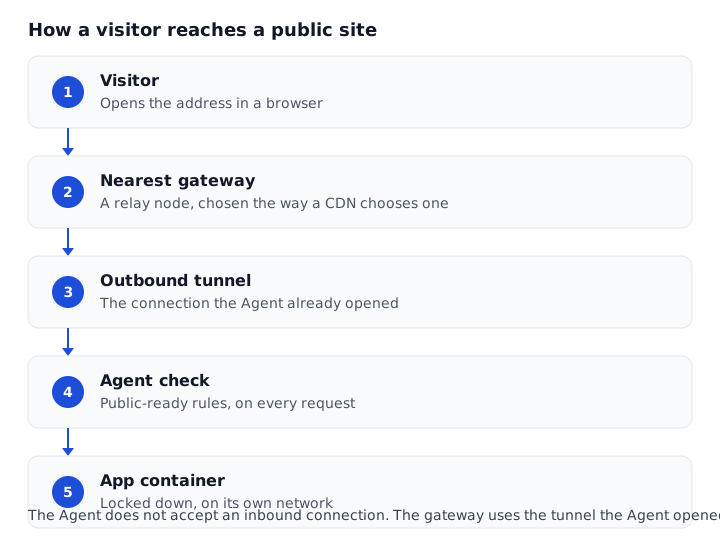
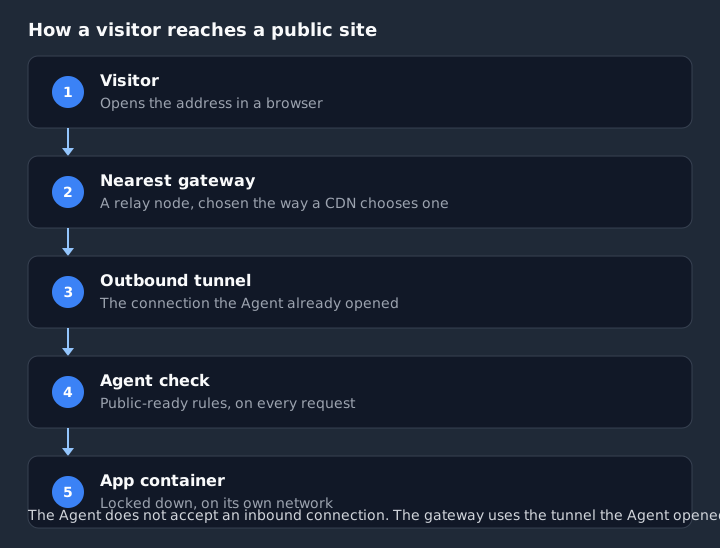
Figure 4: The path of a request. The content stays on the Agent
Gateway and relay nodes run in the same regions as our Cloud Agents. Visitors are routed to the closest node automatically, the way a CDN routes them, and the list of nodes grows as demand grows. The site's content stays on your Agent. For a Cloud Agent, that is in the Cloud region you chose. Visitor traffic is not pinned to one region.
The detail is on Security and isolation and Cloud vs on-premise Agents.
For a site people depend on, use a Cloud Agent
Cloud Agent recommended. A Cloud Agent is always on, restarts on its own, and does not depend on the power or internet connection at the facility. It puts no extra load on the facility network, and you choose the Cloud region it runs in. Use one for a booking page, an event site or a menu that has to stay up. A Physical Agent (on-premise) remains a sound choice when the app should stay on site, or when most visitors are in the building.
Hosting on a Physical Agent (on-premise) has a 50 GB per month fair usage policy, because that visitor traffic goes through Performance Hub relay nodes. It is a fair-use limit, not an extra charge.
What you are trusting
A public site is built for the questions a security review asks.
- The app runs in a locked-down container. A problem in the app cannot reach the rest of the Agent or your network.
- The address is HTTPS, and HTTP is redirected to HTTPS.
- A shared password is stored only as a salted hash, and wrong attempts are slowed down.
- The owner and the organisation admins are told when a site goes on or off the internet.
- The person who turns it on has to acknowledge that Performance Hub sign-in no longer protects the app.
Security and isolation covers each of those in full.
Where to go next
| Put a site on the internet | Publish your first site |
| Use your own domain | Custom domains and DNS |
| Choose where it runs | Cloud vs on-premise Agents |
| Read the security model | Security and isolation |
| Change, pause or remove a site | Managing sites |
| See the limits | Limits and fair use |
| Fix a problem | Troubleshooting |
| Short answers | FAQ |
The Agent can list a site and re-check its domain. It cannot turn a site on, change the address or the password, or add a domain.
Related pages
- Publish your first site
- Security and isolation
- Agent capabilities: publishing to the Performance Hub menu
- Published Apps: the apps your Agent is running, in the desktop app
- Security & privacy: where the Agent's own data lives
- How it works: outbound-only networking