
Connecting your application
The Model Router endpoint is OpenAI-compatible — point any OpenAI SDK, framework, or BYOK-capable tool at the Performance Hub base URL, authenticate with one of your API keys, and it just works. This page is the integration quickstart.
What you need
- An API key. You need to be an Organisation Administrator to create one. Create it under Settings (cog) → Service Access & API Keys → Create key. Keys start with
phk_and the secret is shown only once. See API keys. - The base URL. Shown in the Connecting to the API card on the same settings page:
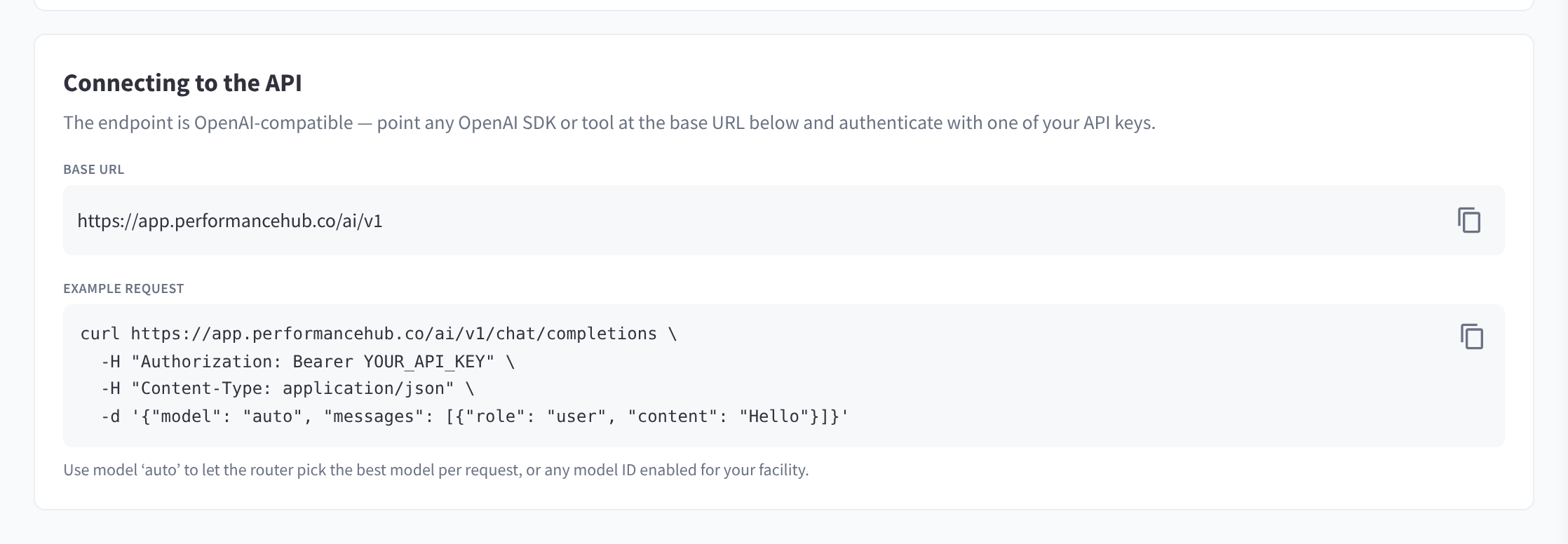
Figure 1: Connecting to the API: the base URL and a copy-paste example request
https://app.performancehub.co/ai/v1
The exact base URL for your environment is always shown in the module — copy it from there rather than from this page.
Authentication
Send your key as a bearer token on every request:
Authorization: Bearer phk_your_key_here
Treat the key like a password. If it leaks, Rotate it (a new secret is issued and the old one stops working immediately) or Revoke it from the API keys list.
Your first request
curl
curl https://app.performancehub.co/ai/v1/chat/completions \
  -H "Authorization: Bearer YOUR_API_KEY" \
  -H "Content-Type: application/json" \
  -d '{"model": "auto", "messages": [{"role": "user", "content": "Hello"}]}'
"Use model 'auto' to let the router pick the best model per request, or any model ID enabled for your facility."
Python (OpenAI SDK)
from openai import OpenAI

client = OpenAI(
    base_url="https://app.performancehub.co/ai/v1",
    api_key="YOUR_API_KEY",
)

response = client.chat.completions.create(
    model="auto",
    messages=[{"role": "user", "content": "Hello"}],
)
print(response.choices[0].message.content)
TypeScript / Node (OpenAI SDK)
import OpenAI from 'openai';

const client = new OpenAI({
  baseURL: 'https://app.performancehub.co/ai/v1',
  apiKey: process.env.PH_API_KEY,
});

const response = await client.chat.completions.create({
  model: 'auto',
  messages: [{ role: 'user', content: 'Hello' }],
});
console.log(response.choices[0].message.content);
Listing models
GET /v1/models returns every model enabled for your facility (honouring any per-key model restriction). Model listing works even when your balance is zero, so integrations can discover the catalog before the account is funded.
curl https://app.performancehub.co/ai/v1/models \
  -H "Authorization: Bearer YOUR_API_KEY"
Use any returned model ID in the model field, or use auto to let the Auto Router pick the best model per request.
Streaming
Streaming works the standard OpenAI way — set "stream": true and consume the server-sent event chunks. The SDK examples above support it via their usual streaming APIs.
Model fallbacks
You can supply an ordered fallback chain so that if the primary model fails, the request is retried on the next one:
models: ["model-a", "model-b", "model-c"]— a full ordered list; the first entry is the primary.- or
model: "model-a"plusfallbacks: ["model-b", "model-c"]— backups tried after the primary.
Fallback candidates are filtered to the models your key is allowed to use.
Error responses
Errors use the standard OpenAI error envelope: { "error": { "message", "type", "code" } }.
| HTTP | type | code | Meaning | What to do |
|---|---|---|---|---|
| 401 | invalid_request_error | invalid_api_key | Missing API key, or invalid connected-service credentials. | Check the Authorization: Bearer header. |
| 401 | invalid_request_error | — | Unknown or revoked API key ("Invalid API key"). | Re-activate the key or create a new one. |
| 402 | insufficient_quota | insufficient_credits | Prepaid balance depleted (or, for connected services, the facility is not enabled). | Top up (or enable auto top-up). |
| 402 | insufficient_quota | budget_exceeded | A spend limit was reached — facility-wide, or on this key or connected service. The message states which window and, for daily/monthly limits, exactly when it resets in the facility's timezone. The body also carries window, resetsAt, timezone and docsUrl fields. | Wait for the reset, raise the limit, or reset the hard cap. |
| 403 | invalid_request_error | — | "Model Router is not enabled for this facility" (API keys), or "Facility has no provisioned inference key" (the key has no backing inference key). | Enable Model Router for the facility (see Getting started). If it's already enabled, rotate the key or create a new one. |
| 403 | invalid_request_error | content_policy_violation | "Request blocked by content policy" — a block-mode content filter or the prompt-injection shield matched the prompt. | Review Guardrails settings. |
| 429 | — | — | Rate limit exceeded (requests/min or tokens/min set on your key). | Back off and retry; raise the key's rate limits if needed. |
| 502 | server_error | — | The upstream inference service is temporarily unavailable. | Retry with backoff. |
Both 402 errors include a docsUrl field, and their message ends with a link to the Performance Hub docs.
Handle 402 gracefully in your integration — it's the expected signal when an account runs out of credit or hits a budget, not a fault.
Good practices
- One key per system. Give each integration its own labelled key so usage is attributable in Activity and Logs, and a leak only requires rotating one key.
- Bound each key. Set per-key spend caps and rate limits appropriate to the system; see API keys.
- Prefer
autounless you need a specific model — you get fast, cheap models for simple work and the strongest models only when a task needs them. - Watch the Logs tab during integration — every request appears with its status, tokens, and cost, which makes debugging integration issues fast. See Activity & logs.