
Partner Linking Methods
Different partners or member management systems identify each facility or location by their own ID, branch ID, or gym ID. We have two types of ways to identify locations during the syncing or pushing of data.
1. Direct Link
When pushing data, the partner will use the facility ID from the Performance Hub system.
For example, for Partner A, their internal ID for a gym in Tokyo is branch_tokyo. But to normalise the data within the Performance Hub ecosystem, we assign a new ID for this location and this partner, for example UUID: 550e8400-e29b-41d4-a716-446655440000.
Partners should use this facility_id when calling our APIs to push data.
To obtain the correct facility_id for linking (as required in the Direct Link method), partners can call the /partner/v1/facilities API endpoint. This endpoint will return a list of all facilities that currently have your partner integration enabled in Performance Hub, along with their corresponding facility_id values.
Example: Direct Link
curl -X POST https://partner-api.performancehub.co/partner/v1/membership-plans \
  -u sk_live_YOUR_PARTNER_SECRET_KEY: \
  -H "Content-Type: application/json" \
  -d '{
    "membership_plans": [
      {
        "membership_plan_id": "plan_unlimited_monthly",
        "facility_id": "550e8400-e29b-41d4-a716-446655440000",
        "name": "Unlimited Monthly Access",
        "billing_cycle": "monthly",
        "price": 10058,
        "currency": "JPY"
      }
    ]
  }'
2. Linking Identifier
The partner maintains their own system with unique identifiers for each location (e.g., "Branch ID", "Location Code", "Store Number"). This linking method allows the partner to identify Performance Hub facilities using their own identifier rather than our Facility ID.
Facility Setup: When a facility enables this partner, they will be prompted to provide the unique identifier that the partner uses to identify their location in their facility configuration within the Performance Hub.
API Integration: When the partner makes API calls to Performance Hub, they can provide their own unique identifier in the request. Performance Hub will internally look up the linking_identifier to match the API call to the correct facility.
Example: If the partner calls locations "Branch ID" in their system, set the label below to "Branch ID". Each facility will then provide their Branch ID value when enabling the integration, allowing seamless data synchronisation between systems.
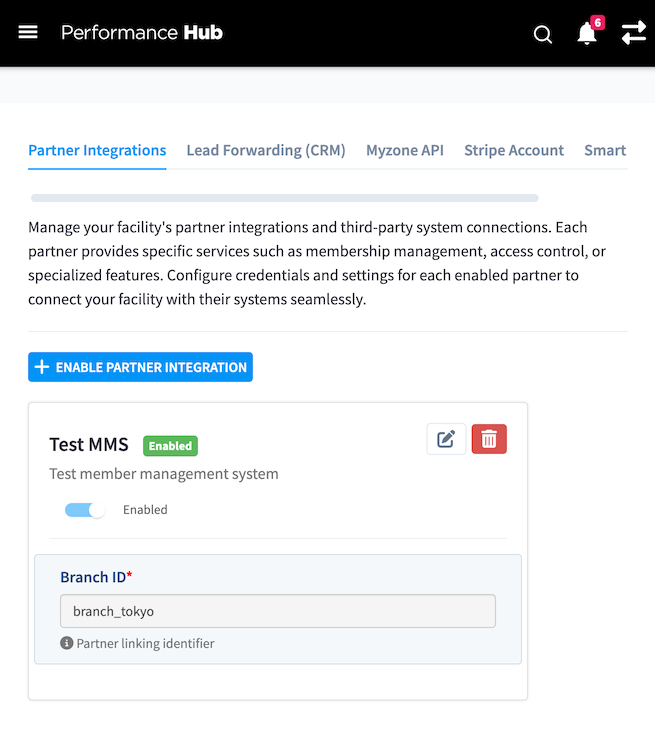 Example configuration from a Facility Integrations Screen (Main Performance Facility View) showing the linking identifier / internal ID from the member management system configured in the partner integrations screen
Example: Linking Identifier
curl -X POST https://partner-api.performancehub.co/partner/v1/membership-plans \
  -u sk_live_YOUR_PARTNER_SECRET_KEY: \
  -H "Content-Type: application/json" \
  -d '{
    "membership_plans": [
      {
        "membership_plan_id": "plan_unlimited_monthly",
        "linking_identifier": "branch_tokyo",
        "name": "Unlimited Monthly Access",
        "billing_cycle": "monthly",
        "price": 10058,
        "currency": "JPY"
      }
    ]
  }'